Security | Threat Detection | Cyberattacks | DevSecOps | Compliance

Proactive vs. Reactive Incident Response: Building a Stronger Security Strategy

Think of your organization’s cybersecurity as a combination of a shield and a sword. The shield represents proactive incident response – your first line of defense that anticipates and prevents potential threats. This could include app security tips or best practices for business cybersecurity, which work to prevent incidents before they occur through continuous monitoring, threat hunting, and vulnerability assessments.

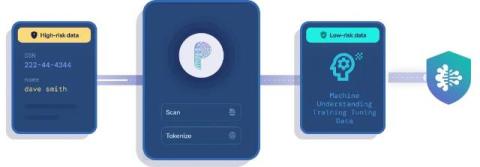
Secure API Keys and Passwords with Nightfall's AI-Native DLP

API keys and passwords are the keys to digital kingdoms, granting access to an organization’s most valuable systems and data. Traditional data loss prevention (DLP) systems often fall short in their attempts to protect sensitive data and secrets, leaving security teams overwhelmed with false positives and noise. At Nightfall, we understand these challenges and the evolving threat landscape across SaaS and endpoints.

Strengthening Healthcare Security: Navigating HIPAA's Latest Cybersecurity Requirements

The Department of Health and Human Services (HHS) will be implementing sweeping and crucial updates to the Health Insurance Portability and Accountability Act (HIPAA) Security Rule to enhance the protection of electronic protected health information (ePHI). These changes aim to address modern cybersecurity threats and ensure resilience in healthcare data management. In this blog, we will explore the key updates and their implications for healthcare providers and their business associates.

Honoring Dave Täht and his contributions to a better Internet (video calls included)

Dave Täht died this week (August 11, 1965 – April 1, 2025), and Tom Strickx, Principal Network Engineer at Cloudflare, honors his contributions to help build a better Internet. Dave Täht was an American network engineer, musician, lecturer, asteroid exploration advocate, and Internet activist. Without his work, FQ-CoDel wouldn't exist — and low-latency networking, from Wi-Fi to Starlink and video calls, would likely be worse today.

A Beginner's Guide to PowerShell String Replace Techniques

Being able to find and replace specific text within strings is useful for many tasks, including data processing, automation and file management. For instance, replacing outdated information with current data is important for data standardization. PowerShell offers two primary methods for string replacement: For example, suppose we want to replace the string “Hello” with “Hi.” Here is a script for accomplishing this using the Replace() method.