Security | Threat Detection | Cyberattacks | DevSecOps | Compliance

The Real Reason Hackers Target Active Directory First

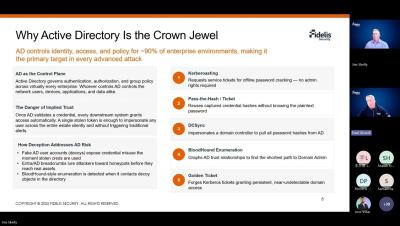
Active Directory controls access to nearly every application, file, and system in your network. That's exactly why it's the first thing attackers go after. Get privileged access to AD, and an attacker doesn't need to break into ten different systems. They just need one path in, and from there they can move freely, escalate privileges, and sit undetected for weeks. AI is making this worse. Faster reconnaissance, sharper phishing, quicker lateral movement, all pointed straight at identity infrastructure.

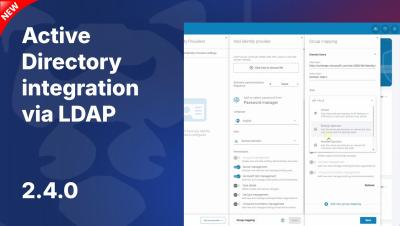
GitProtect.io & Active Directory Integration (LDAP) | User Management Automation

User management in GitProtect.io is becoming even simpler! In version 2.4, we introduced direct integration with Active Directory via the LDAP/LDAPS protocol. Streamline your administration and replicate your company's hierarchy in minutes. In this tutorial, you'll learn how to establish a secure AD connection, handle verification certificates, and map AD groups to corresponding roles inside the GitProtect.io console.

What's new in Active Roles 8.5

Active Roles by One Identity version 8.3 provides several highly requested features to fortify and enrich the integration capabilities of Active Roles. These new features bring unmatched flexibility and security to Active Directory environments, supporting customers where they are today and where they want to go in the future. Watch this short video to find out how these features can help streamline and protect your Active Directory.

Acronis extends Microsoft 365 protection with Entra ID Backup

Attackers have long focused on email and endpoints, but now they are increasingly targeting the identity layer that controls access to those resources. The new approach is subversive and highly effective: By compromising identities, threat actors can gain access to Microsoft 365, SaaS applications, devices and administrative functions without tripping the same alarms that traditional attacks trigger.

Microsoft Entra ID: Identity Infrastructure and Risks Overview

Explore how Microsoft Entra ID unifies identity across cloud platforms including Microsoft 365 and Microsoft Azure, HR systems, and on-premises directories - enabling secure sign-in, lifecycle management, and access control. This video explains why identity protection is essential for operational continuity, compliance, and cyber resilience, and highlights the importance of backup and recovery for the identity layer.

Powerful LDAP extended controls: Anti-remediation and invisible recon in AD

I ran an audit against every MS-ADTS LDAP extended control. Most behave exactly as documented; two stood out for potential offensive use. Both abusing legitimate controls, but neither a privilege escalation: The unifying theme: a documented LDAP control, used as intended at the mechanism level, produces an effect Microsoft's telemetry and most defenders don't expect. Demonstrated against a two-DC cloud.lab (Windows Server 2022, forest functional level 2016). Lab / authorized-research context only.

Optimize Microsoft Entra ID Conditional Access | Reach Security

Which of your users can reach a sensitive app without ever hitting MFA? Most security teams can't answer that with confidence. Microsoft Entra ID and Conditional Access is powerful. But exclusions stack up, MFA coverage drifts, and risk-based protections go unused. This creates openings for fast-moving AI-powered attackers. Reach continuously validates your controls against your security intent, closes the gaps, and proves the risk reduction.

AD, AD domains, and primary domain controllers: The backbone of enterprise identity-and why DNS keeps it alive

At some point, every enterprise faces the same quiet operational nightmare: hundreds of users, thousands of devices, multiple locations, and someone in the IT department manually managing who gets access to what. Active Directory (AD) was Microsoft's answer to that problem when it shipped with Windows 2000, and it remains, over two decades later, the dominant identity and access infrastructure in enterprise networks worldwide.

Conditional Access Checklist for Microsoft Entra ID

Conditional Access is one of the most important security controls in Microsoft Entra ID. It helps organizations decide when access should be allowed, blocked, or challenged based on signals such as user identity, device status, location, application, and risk. For many organizations, Conditional Access is the best path forward for enforcing multifactor authentication because it provides more control than Security Defaults or Per-User MFA.