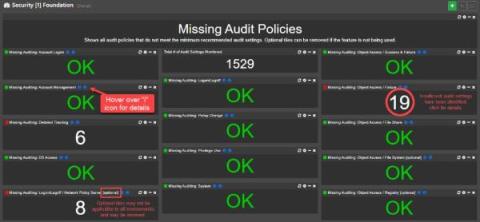
We’re extremely excited to announce the availability of the EventSentry v5.1, which will detect threats and suspicious behavior more effectively – while also providing users with additional reports and dashboards for CMMC and TISAX compliance. The usability of EventSentry was also improved across the board, making it easier to use, manage and maintain EventSentry on a day-by-day basis. We also released 60+ training videos to help you get started and take EventSentry to the next level.
In Part 1 of this series, we talked about some challenges with building sufficient coverage for detecting security threats. We also discussed how telemetry sources like logs are invaluable for detecting potential threats to your environment because they provide crucial details about who is accessing service resources, why they are accessing them, and whether any changes have been made.
As regulatory requirements continue to evolve and data breaches become more common, businesses are under increasing pressure to maintain compliance with industry standards. Compliance monitoring is a crucial aspect of this process, enabling organizations to identify and address potential risks before they lead to costly violations or incidents.
In today’s ever changing cyber risk landscape, your organization must adopt a vulnerability management framework to control exposure and remediate risks in a timely manner. In an earlier blog, we explained the vulnerability management process. Here, we explore a key part of that process – vulnerability monitoring – in greater depth.
In this blogpost, we will take a close look at file access auditing on an EMC Isilon file system by leveraging native technologies. We will walk through the configuration process and explore the common challenges faced when working with the resultant audit logs.
I logged into one of my online accounts today, and the entire interface was different. At first, I checked to make sure that I was actually on the correct site. Once I confirmed that, I just accepted that the company who runs the software made changes that would improve the performance and functionality of the software. Once I logged in, I noticed that even the desktop icon had changed.