Security | Threat Detection | Cyberattacks | DevSecOps | Compliance

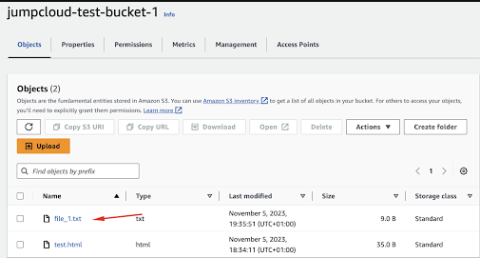
How To Work with Amazon S3 on Amazon Linux

Jump to Tutorial Amazon Simple Storage Service (Amazon S3) is a scalable, high-speed, web-based cloud storage service designed for online backup and archiving of data and applications on Amazon Web Services (AWS). It is designed to make web-scale computing easier for developers and allows you to store and retrieve any amount of data, at any time, from anywhere on the web. Amazon Linux, on the other hand, is a Linux server operating system from AWS, which is engineered for high performance and stability.
IT Asset Management vs. Device Management

Devices are the gateways to our work, and IT professionals understand the importance of managing and securing endpoints as part of a holistic identity and access management (IAM) strategy. Yet, it’s impossible to control what you aren’t aware of. Shadow IT, the unauthorized use of devices, apps, and services that people use to perform their jobs, can bypass even the best security programs.

JumpCloud Acquires Resmo for Integrated Asset Management

JumpCloud has acquired Resmo, an asset management and SaaS security solution, to provide customers a unified solution of SaaS, IT security, and asset management that empowers them to eliminate shadow IT and gain full visibility into all apps and cloud infrastructure in an all-in-one solution. The inclusion of Resmo’s technologies will enhance JumpCloud’s ability to help customers deliver secure and streamlined user provisioning, access request management, and utilization monitoring.

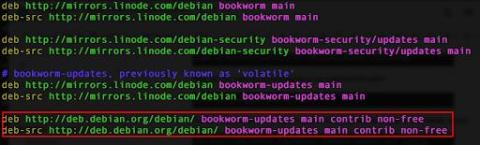
How to Manage APT Repositories on Debian or Ubuntu

Jump to Tutorial Advanced Package Tool (APT) is the backbone of package management on Debian and Ubuntu systems. It simplifies the process of installing, updating, and removing software. APT works with repositories — designated locations that host packages and update information. Mastering APT repository management ensures you have access to the software you need and that your system remains secure and up to date.
Featured Post

SMEs Invest in Tech Opportunities but Risk Missing Security Safeguards

Across Europe, 100 million people are employed by small and medium-sized enterprises (SMEs). The UK has over five million SMEs, providing three-fifths of employment and £2.4 trillion in turnover. As a vital component in the national economy, SMEs must continue to invest in automation, technology-led innovation, and underpin this with strong security.

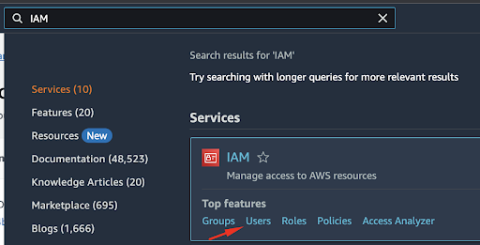
What Is Linux Identity and Access Management?

Identity and access management (IAM) provides a consistent, centralized solution to manage user identities and automate access control throughout the organization. This helps security leaders introduce role-based access control and meet governance, risk, and compliance goals. Your organization may already have centralized management policies in place. For example, requiring employees to use a VPN when accessing company assets remotely shows an IAM solution in action.

OneLogin Alternatives: Comparing JumpCloud vs. OneLogin

Assigning users to the right devices, applications, networks, VPNs, and files is a critical part of every company’s IT workflow. Get it wrong, and you’ve instantly tarnished a new hire’s experience — or worse, opened the door to security and compliance violations. With so much riding on this one component of IT or MSP work, organizations of any size need to be judicious about the identity and access management (IAM) tools they select.

Using the AWS CLI with Amazon Linux

Amazon Web Services (AWS) provides a wide array of cloud computing solutions. Mastering the AWS Command Line Interface (CLI) is an essential skill for developers, system administrators, and cloud engineers working within its ecosystem. Amazon Linux, an open source Linux distribution provided by AWS, is optimized for running on AWS infrastructure, making it a popular choice for cloud-based applications.

What is Privileged Identity Management?

Every organization has to assign privileges to its user accounts. Good security practice requires each account to have only the privileges necessary for the role it’s assigned to. Ideally, that means only a few accounts have wide-ranging privileges capable of significantly changing the organization’s security configuration. These typically include systems administrators, database administrators, and service accounts. These accounts are especially vulnerable to security and compliance risks.