Security | Threat Detection | Cyberattacks | DevSecOps | Compliance

Windows 10 most critical vulnerabilities in 2022

Microsoft Windows 10 tops the list in terms of users around the world. Among those users, some belong to IT backgrounds but a majority of those users are not acquainted with IT, which means that they have limited knowledge about cybersecurity and its importance. Companies like Microsoft are prone to multiple attacks by bounty hunters or even black hat hackers intending to disturb the company’s operations.

How To Secure Default IIS Site & Enable Windows Authentication

By default, when you create a new Internet Information Services (IIS) website, it’s open to everyone with anonymous access enabled — anyone can access and view the data being hosted by that site. Obviously, this is a security concern for most organizations. Indeed, I’m often asked by clients and colleagues how to lock down an IIS site so only the desired people can access it.

Find threats: Cloud credential theft on Windows endpoints

In today’s hybrid, multi-cloud environments, users and administrators connect to various cloud services using Command Line Interface (CLI) tools and web browsers. This post highlights the risks associated with unprotected and unmonitored cloud credentials which are found on endpoints, in file shares and in browser cookies. Get actionable and direct guidance around: In order to alert on and hunt for this malicious activity. Business workloads are increasingly undergoing a migration to the cloud.

What is Windows Code Signing Certificate [ A Detailed Guide]

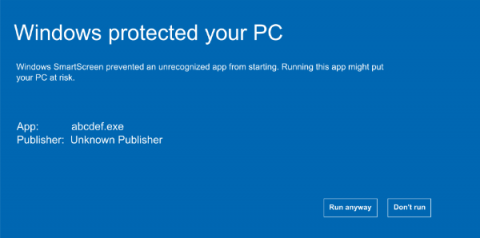
A Windows code signing certificate is crucial for a developer as well as a user. This is because these certificates add a layer of security to a digital solution. Feeling that the software is secure to use, the consumer engages with it easily. On the other hand, for a developer or development company reinforcing their software with a signing certificate means good business.

Modernize and Migrate to Egnyte to Replace Your Windows File Server

For decades, Microsoft’s Windows Server has been a mainstay for businesses of all sizes, most notably as a file server. However, as companies adapt to remote work, increasing cyber threats, and growing data privacy regulation, many are considering shifting their Windows file server to the cloud—or replacing it altogether. Egnyte is a great fit for companies looking to migrate their Windows file server to a modern platform designed for the new way of work.

Detecting CVE-2022-30216: Windows Server Service Tampering

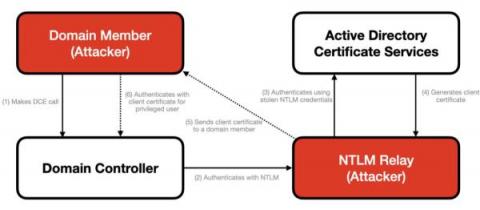
In July 2022, Microsoft disclosed a vulnerability in the Windows Server Service that allows an authenticated user to remotely access a local API call on a domain controller, which triggers an NTLM request. This results in a leak of credentials that allows an attacker to authenticate to Active Directory Certification Services (ADCS) and to generate a client certificate that enables remote code execution on a domain controller.

Windows SAM & AD SAM Security - Essential Guide 2023

The Security Accounts Manager (SAM) is a database file in Windows operating system that comprises of usernames and passwords. The main aim behind SAM is to make our system more secure and reliable by protecting credentials in case of a data breach. Configuring SAM gives users the ability to authenticate themselves to the local machine if an account has been created for them in security accounts manager.

Detecting and Mitigating NTLM Relay Attacks Targeting Microsoft Domain Controllers

Adversaries often exploit legacy protocols like Windows NTLM that unfortunately remain widely deployed despite known vulnerabilities. Previous CrowdStrike blog posts have covered critical vulnerabilities in NTLM that allow remote code execution and other NTLM attacks where attackers could exploit vulnerabilities to bypass MIC (Message Integrity Code) protection, session signing and EPA (Enhanced Protection for Authentication).

Choosing an RDP Client

Controlling your Windows PC remotely can open a world of possibilities; remote work, remote assistance, remote system diagnosis and network troubleshooting are just some of the advantages of using Remote Desktop Protocol or RDP. Developed by Microsoft, RDP allows you to remotely connect to another computer over a network, giving you full access to and control over the computer’s software, data and resources.