Security | Threat Detection | Cyberattacks | DevSecOps | Compliance

SaaS Doesn't Mean Secure: Why You Should Back Up Your Source Code

Your source code sits on GitHub, GitLab, Bitbucket, or Azure DevOps, along with your pipeline configurations, issue history, permissions, and metadata. Most teams assume it’s safe there because it works. But is it? Financial institutions, technology companies, and software houses all build the systems they run on. Code stopped being a byproduct of the business and became the business. And as it turns out, it needs protection of its own.

OT vs IT: The Key Differences Between Operational Technology and Information Technology

Information technology and operational technology are increasingly connected, but they are not interchangeable. IT is built around information and business services; OT is built around physical processes, equipment and safe operation. That difference shapes their security priorities, asset lifecycles, maintenance practices, network architecture and recovery requirements.

How to stop sensitive data leaking into ChatGPT, Copilot and other GenAI tools

AI productivity tools are creating a prompt-level data leakage problem: 77% of employees paste data into generative AI tools, and 82% of that activity comes from unmanaged accounts, according to the LayerX Enterprise AI and SaaS Data Security Report 2025. Every paste into ChatGPT, Copilot or another GenAI tool is a potential exposure of sensitive data that traditional file-focused controls were never built to see.

Kubernetes Zero Trust: Principles and How to Apply Them

Kubernetes trusts everything inside the cluster by default. Any pod can reach any other pod, IPs change with every rolling deployment, and one compromised container gives an attacker a path across your entire environment. Kubernetes zero trust replaces that default with a simple rule: Never trust, always verify, regardless of where a request comes from.

How to Configure Tape Backup in NAKIVO Backup & Replication

Learn how to configure tape as a backup target in NAKIVO Backup & Replication. This tutorial covers the disk-to-disk-to-tape workflow end to end: hardware and Transporter requirements, adding a robotic library, VTL, or standalone drive, managing tapes, locations, and media pools, and creating a Backup Copy job that writes to tape with the right schedule and retention.

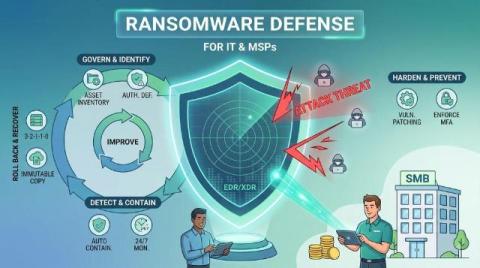
How to prevent ransomware damage: a 12-step checklist for IT teams and MSPs

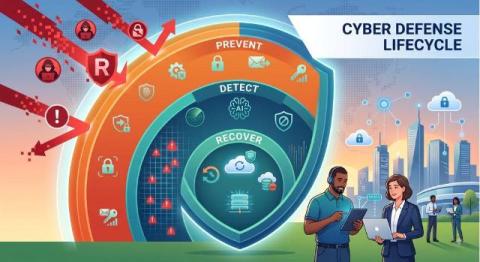
No combination of controls guarantees that ransomware actors will never gain access or cause any impact. What the 12 controls below do is reduce the attacker's opportunities, accelerate containment and preserve the ability to restore operations without relying on ransom payment. Think of ransomware resilience as a continuous lifecycle rather than a fixed sequence: govern and identify, harden and prevent, detect and contain, roll back and recover, and improve and patch.

Ransomware protection for businesses and MSPs: the complete guide

Ransomware protection is a coordinated set of controls that reduces the likelihood of compromise, detects and contains malicious activity, protects recovery infrastructure and restores operations when an attack succeeds. It spans identity security, vulnerability and patch management, endpoint protection, EDR or XDR, incident response, targeted rollback, immutable backup and disaster recovery. No single control covers the complete ransomware lifecycle.

How does EDR work? Architecture, monitoring, detection and response explained

EDR (endpoint detection and response) works by deploying sensors on protected endpoints to continuously collect selected behavioral telemetry, forwarding that telemetry to a centralized analytics layer, commonly cloud-hosted, that applies detection rules, behavioral analytics, machine learning and threat intelligence, and surfacing prioritized incidents in a console where analysts can investigate and respond.