
Why unmanaged RDP is risky at enterprise scale (and how to regain control)
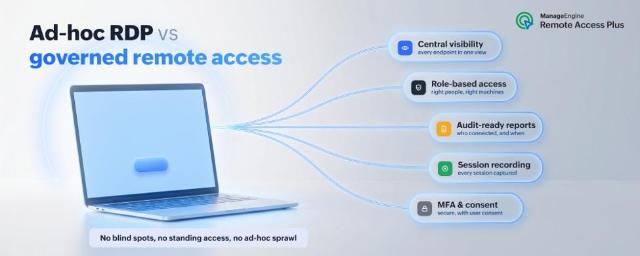
Remote Desktop Protocol (RDP) is the path of least resistance for gaining access to another Windows machine. It is built into the OS, it is free, and almost every admin and help desk technician already knows how to fire up mstsc.exe and type in a hostname—as simple as that. That convenience is exactly why RDP is everywhere inside corporate networks.
But there is a difference between being able to connect to a remote machine and being able to govern how that connection happens–who can reach what, under what circumstances, and with what record is left behind. In this post, we will look at where ad-hoc RDP quietly falls short at enterprise scale, and what a managed, governed approach to remote access adds on top.
What ad-hoc RDP looks like inside an enterprise
In a small environment, RDP is simple. In a larger one, "simple" tends to sprawl. The pattern usually looks something like this: Technicians and server and application owners keep their own lists of server names and IP addresses, scattered RDP files live on individual desktops, a handful of shared local administrator credentials get passed around so people can log in quickly, and firewall exceptions for port 3389 accumulate over time. Each session is a private, one-off event between one user and one machine.
None of this is wrong on its own. Collectively, though, it means remote access is happening constantly with no shared infrastructure behind it. In short, ad-hoc RDP is access without governance. The connection works, but nobody owns the bigger picture of how access is granted, monitored, and recorded across the organization.
The governance gaps that arise in ad-hoc RDP
No central visibility or accountability
The most basic question an IT manager should be able to answer is, “Who is connected to what, right now?” With ad-hoc RDP, there is no single place with this information. Each session is visible only to the person who started it. There is no dashboard of active connections, no way to see at a glance which servers are being accessed, and no easy way to spot an unauthorized remote session. Shared accounts make this worse: If three people use the same local admin login, the logs that do exist cannot tell you which human was actually at the keyboard. Visibility and attribution are the foundation of everything else, and ad-hoc usage starts with neither.
Weak audit readiness
Sooner or later, someone asks the audit question: “Who accessed this server, when, and what did they do while they were on it?” Organizations that must comply with HIPAA, the PCI DSS, SOX, or ISO 27001, must also be able to answer that question. Native RDP was not designed to answer it. There is no built-in session recording, no consolidated cross-machine log of remote activity, and no clean trail mapping a person to a session. You can stitch together fragments from Windows event logs on individual hosts, but reconstructing a complete, defensible audit story after the fact is slow and incomplete—and "we couldn’t tell" is the worst possible answer to give an auditor.
A larger, harder-to-defend attack surface
RDP’s ubiquity makes it a favorite go-to target. It has repeatedly ranked among the most common ways attackers move once they are inside a network. Cisco Talos’ incident response data named RDP the top lateral-movement technique through the second half of 2025. Multiple critical RDP vulnerabilities were also disclosed in 2025 (including CVE-2025-48817 and CVE-2025-29966). Importantly, most RDP intrusions don’t even rely on a software bug; they exploit weak or reused credentials combined with little to no monitoring.
Native RDP also can’t enforce multi-factor authentication (MFA) on its own without bolt-on tooling, and Microsoft itself now shows a security warning when you open an RDP file because malicious RDP files have become a phishing vehicle.
Ad-hoc usage amplifies all of this. Every additional exposed endpoint, every standing firewall exception, and every set of always-on credentials widens the surface. Standing access accounts and openings that are permanently available "just in case" are precisely what attackers look for. Access that is granted only when needed, and revoked when finished, is far harder to abuse.
Coarse access control and no approval workflow
Native RDP access is essentially binary: A user is either in the Remote Desktop Users group (or has the right policy) or they are not. There is no native concept of role-based scoping (this technician can reach these machines but not those), no approval step before a critical server is accessed, no time-boxing of access to a maintenance window, and no per-session consent. Least-privilege and just-in-time access are hard to express with RDP’s all-or-nothing model, which pushes teams toward over-provisioning simply because fine-grained control is too much manual effort.
Reachability and cross-platform blind spots
RDP is a Windows protocol, and not even for all of Windows—Home editions don’t include the RDP host. The moment your fleet includes Macs, Linux servers, or Android devices, RDP cannot help, and teams end up bolting on a second or third tool to cover the gaps. RDP also assumes network reachability: The target has to be on the same network or reachable through a VPN, which means more VPN seats, more tunnels, and broad network-level access just to fix one machine. Roaming laptops, remote employees, and machines behind NAT all complicate what should be simply connecting and troubleshooting.
Painful scaling and concurrency
A standard Windows desktop allows a single interactive session. Supporting multiple concurrent remote sessions properly means Windows Server, the Remote Desktop Session Host role, and per-user RDS Client Access Licenses (CALs) add to the real cost and administrative overhead.
The unofficial shortcuts that float around (such as patching termsrv.dll or RDP wrapper libraries) are fragile, break on Windows updates, and carry their own licensing and security risks. And because each RDP session is one technician to one machine, there is no native way to perform an action across many endpoints at once—restarting a service on fifty machines, for example, becomes fifty odd separate logins.
No link to the help desk or ESM workflow
This is the gap that quietly costs the most time. RDP lives entirely outside your ticketing and enterprise service management (ESM) tools. A technician picks up a ticket in one window, then manually opens a completely separate RDP session in another, with nothing connecting the two. There is no launching a session directly from the ticket, no automatic logging of what happened back onto that ticket, and no record tying the remote work to the request that prompted it. Important context like who asked, why, and what was done gets scattered or lost, and reporting on IT support activities becomes guesswork.
How governed remote access tools help
Step back from the individual gaps and a pattern emerges: Ad-hoc RDP optimizes for the convenience of a single connection, while an enterprise needs to optimize for remote control across thousands devices. A managed remote access layer doesn’t throw RDP’s familiarity away; it wraps remote sessions in the structure the protocol never provided. When evaluating this category of tool, the capabilities worth insisting on are:
- A single console showing every endpoint and every active session, so the question, "Who is connected to what?" has an answer
- Identity-based, role-based access control with end-user consent and time-bound access, instead of all-or-nothing arrangement
- Session recording and consolidated, audit-ready logs that map a person to a session to actions
- Strong encryption and built-in MFA, plus controls like screen blackout and the ability to disable end-user input during sensitive work
- Reachability without standing VPN tunnels, and coverage for Windows, macOS, Linux, and mobile from one place
- Bulk operations across many machines, and integration with your help desk or ESM workflow so sessions and their records attach to tickets
That list is essentially a specification for closing every gap described above.
Where Remote Access Plus fits
ManageEngine Remote Access Plus is an enterprise remote access and troubleshooting solution that lets system administrators and help desk technicians reach and support Windows, macOS, Linux, and Android endpoints from one central console. It is available both on-premises and in the cloud, without requiring a VPN or the target to sit on the same business IT network.
Mapped against the gaps in ad-hoc RDP, the relevant pieces line up directly:
- Visibility and auditing: A unified dashboard of endpoints and sessions, with session and screen recording and audit-ready reports covering initiated remote sessions, chat history, and registry exports—the trail native RDP can’t produce.
- Security and consent: 256-bit AES encryption over TLS 1.2, support for HIPAA and PCI DSS compliance, role-based access control, two-factor authentication, end-user consent before a session starts, on-screen blackout to prevent data leaks, the ability to disable end-user input during troubleshooting, and automatic log-off settings.
- Reach and scale: Cross-platform coverage from a single tool; no-VPN connectivity; Wake on LAN to boot machines on demand; and remote shutdown, lock, and sleep functions that can run in bulk across many endpoints at once.
- Workflow and depth: A System Manager with more than 12 tools for processes, services, Command Prompt, registry, users, files, shares, printers, and more, plus voice, video, and text chat for collaborative, attended support—turning a remote connection into a structured support session rather than a blind login.
Crucially, you don’t have to start with a budget conversation to try it. Remote Access Plus offers a fully functional, free edition, alongside Standard and Professional tiers as needs grow.
If your team’s current remote access strategy is really just a habit of opening mstsc.exe, the most direct next step is to see the governed alternative in action. ManageEngine’s free Windows Remote Desktop alternative lets you put central control, consent, and audit-ready logging in front of your remote sessions without replacing the day-to-day simplicity your technicians expect.
FAQ
Is RDP secure enough for enterprise use?
RDP can be operated securely, but it isn’t secure by default. It can’t enforce MFA on its own, ships without an account-lockout policy, and is a frequent target for credential-based attacks and lateral movement. Used securely at scale, it needs hardening, monitoring, and access controls layered on top, which is much of what a managed remote access tool provides out of the box.
Can I use RDP for multiple simultaneous sessions on Windows?
Not on a standard desktop, which allows a single interactive session. Supporting multiple concurrent sessions properly requires Windows Server with the Remote Desktop Session Host role and per-user RDS CALs. The unofficial work-arounds (modifying termsrv.dll or using RDP wrapper libraries) are fragile, tend to break after Windows updates, and carry licensing and security risks.
What’s the difference between RDP and a managed remote access tool?
RDP is a protocol for connecting to a single machine. A managed remote access tool is a platform that governs many such connections, adding central visibility, role-based access, consent, session recording, audit logs, cross-platform support, and help desk integration. RDP answers, "Can I connect?"; a managed tool answers, "Is this connection authorized, monitored, and recorded?"
Does Remote Access Plus replace RDP?
Think of it as covering the same job—reaching and troubleshooting remote machines—while adding the governance, security, and cross-platform reach that ad-hoc RDP lacks. For most enterprise IT and help desk teams, that means a more controlled and auditable way to do what they were already using RDP for.
Is there a free alternative to Windows RDP?
Yes. ManageEngine Remote Access Plus has a fully functional, free edition. You can explore it here: free Windows Remote Desktop alternative.
Author Bio:
Nikhil Narayan is a Product Marketing Manager at ManageEngine with 7+ years of experience in remote access solutions. As a marketing analyst and writer, he covers enterprise IT, remote support, endpoint management, and digital workplace technologies.