
Open-Source Intelligence Tools for Security Teams
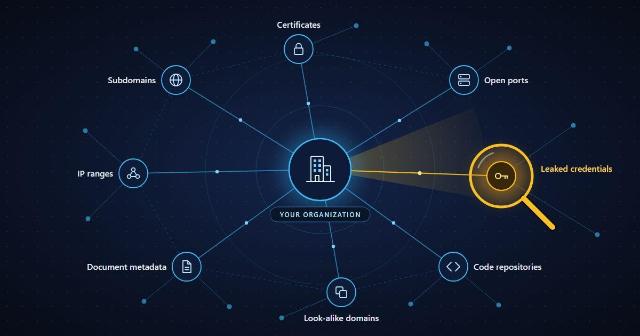
Attackers rarely start with an exploit. They start with a search: which subdomains a company runs, which staff email addresses sit in breach dumps, which forgotten server still answers on the internet. MITRE ATT&CK treats this stage as a tactic of its own, Reconnaissance, and most of it runs on public data.
Open-source intelligence (OSINT) is the practice of collecting and analyzing that public data. "Open source" describes the information, not the software license: some of the tools below are free, open-source projects, and others are commercial services with a free tier. For a security team the value is simple. OSINT shows your organization the way an outsider sees it, before an outsider acts on what they find.
What OSINT Does for a Security Team
Most OSINT work in a security team falls into five jobs:
- Attack surface mapping. Find the domains, subdomains, IP ranges and exposed services that belong to you, including the ones nobody remembers launching.
- Credential and data exposure. Check whether staff addresses, passwords, API keys or internal documents have turned up in breach dumps, paste sites or public code repositories.
- Phishing and brand monitoring. Spot look-alike domains, fake login pages and cloned social profiles while they are still being set up.
- Alert enrichment. Give an indicator some context: who owns this IP address, what else is hosted on it, and whether anyone has reported it.
- Third-party risk. Run the same checks on suppliers and acquisition targets without asking them for access.
No single tool covers all five. A working toolkit has one or two tools for each job and a way to tie the results together.
The Core Toolkit
Asset and subdomain discovery
- OWASP Amass maps an organization's external assets by combining DNS records, certificate data and dozens of other sources. Free and open source.
- Subfinder does one thing quickly: passive subdomain enumeration. Free and open source.
- theHarvester collects email addresses, hostnames and subdomains from search engines and public databases. Free and open source.
- crt.sh searches certificate transparency logs, so you can list the certificates that have been publicly logged for your domains. Free.
Exposed devices and services
- Shodan indexes internet-connected devices and shows their open ports, service banners and known vulnerabilities. Free tier and paid plans.
- Censys offers comparable host and certificate data from its own internet-wide scans. Free tier and paid plans.
Automation and link analysis
- SpiderFoot runs more than 200 modules against a domain, IP address or email address and correlates what they return. Free and open source.
- Recon-ng is a modular reconnaissance framework with a console that feels familiar to Metasploit users. Free and open source.
- Maltego draws the relationships between domains, people, companies and infrastructure as a graph. Free community edition and paid plans.
Breach and credential exposure
- Have I Been Pwned has a domain search that lists which addresses on your domains appear in known breaches. Free for small domains, paid plans for larger ones.
- TruffleHog scans Git repositories for leaked API keys, tokens and passwords. Free and open source.
Indicator enrichment
- VirusTotal returns reputation and relationship data for files, URLs, domains and IP addresses. Free and paid access.
- urlscan.io loads a URL in an isolated browser and records the screenshot, redirects and network requests, so nobody on your team has to open the page. Free and paid access.
- GreyNoise shows whether an IP address belongs to the internet's background scanning noise, which helps separate mass scans from targeted activity. Free community access and paid plans.
Storing and sharing intelligence
- MISP stores and correlates indicators and shares them with other organizations. Free and open source.
- OpenCTI structures threat intelligence as a knowledge graph built on the STIX 2 standard. Open source, with a paid enterprise edition.
Document metadata
- ExifTool reads the metadata in images, PDFs and office files, which often includes author names, software versions and GPS coordinates. Free and open source.
Where You Collect From Matters
The tools decide what you collect. The network they run on decides what you are shown, and who notices you looking.
Two problems come up when collection runs from the office network. First, it identifies you. An operator watching the logs of a phishing server sees a visit from the target company's own IP range and knows the campaign has been found. Second, it can show you the wrong page. Many phishing kits and malicious ad campaigns check a visitor's country, network type and device. They serve the real payload only to the audience they are after and send everyone else to a harmless page.
Security teams solve both problems by sending collection traffic through a separate exit point. A proxy network such as ProxyEmpire provides residential and mobile IP addresses in more than 170 countries, with targeting by country, city and ISP. An analyst can load a suspicious page the way a local home or mobile user would see it. Scheduled jobs, such as daily look-alike domain checks, can run at volume without touching the company's own address range.
Keep that traffic apart from everything else: a dedicated browser profile or virtual machine, no corporate logins, and a record of what was collected and when.
A Repeatable OSINT Workflow
Tools produce lists. A workflow turns those lists into fixes.
- Set the scope. Write down the domains, brands, executives and suppliers you are allowed to investigate, and get that list approved.
- Collect passively first. Run Amass in passive mode, Subfinder and crt.sh, then look the results up in Shodan or Censys. These query third-party data, so nothing touches the systems you are studying.
- Check for exposure. Search Have I Been Pwned for your domains and scan your public repositories for secrets.
- Enrich and verify. Pass suspicious domains and IP addresses through VirusTotal, urlscan.io and GreyNoise. Confirm each finding by hand before it becomes a ticket, because public data is often out of date.
- Record it. Store confirmed indicators in MISP or OpenCTI so the next analyst does not start from zero.
- Repeat on a schedule. New subdomains, certificates and look-alike domains appear all the time. Rerun discovery regularly and review only what changed since the last run.
Legal and Ethical Ground Rules
Public does not mean unrestricted. Four rules keep an OSINT program out of trouble:
- Work from written authorization. Passive lookups on your own organization are low risk. Port scans, login attempts and anything aimed at a third party need explicit permission.
- Treat personal data as personal data. Staff names, private email addresses and social profiles fall under privacy laws such as the GDPR even when anyone can find them. Collect only what the task needs and set a retention period.
- Read the terms of the sources you use. Rate limits and API terms vary, and some sources forbid automated collection altogether.
- Protect what you gather. A file listing your organization's exposed assets and leaked credentials is exactly what an attacker wants. Store it like any other sensitive finding.
Where to Start
A team new to OSINT does not need every tool on this list on day one. Start with three free checks on your own organization: list your subdomains with Amass and crt.sh, look them up in Shodan, and run your domains through Have I Been Pwned. Those three usually surface something nobody knew was exposed, and that first finding is the best argument for building the rest of the program.