
Fake Maccy Stealer

If you've ever copied a password, a 2FA code, or an API token, you've trusted your clipboard to hold it for a moment. Most of us never think twice about it. That small, invisible convenience is exactly what a newly discovered macOS malware campaign is designed to exploit.
The attack begins with a simple search for Maccy, a popular open-source clipboard manager for Mac. A user clicks a result that appears next to the legitimate website, downloads what looks like an installer, and runs it. Within moments, a hidden script drops a disguised program onto the Mac, gives it the Finder name and icon, and configures it to launch whenever the user logs in.
From there, the malware begins collecting saved passwords, browser credentials, Apple Notes content, and whatever happens to be stored in the clipboard. To the user, nothing appears out of place.
During analysis our team uncovered and analyzed this previously undocumented campaign, which we track internally as MacOSapp1, a name taken from a string hardcoded inside the malware. Our investigation traced the attack from the fake Maccy download page and concealed Script Editor routine to the Finder-masquerading payload, Login Item persistence, credential theft, and command-and-control infrastructure.
What makes this campaign worth documenting is not simply the bait. Fake domains impersonating trusted applications are already a familiar attack technique. What stands out is the way the malware executes and persists. It uses an execution path that slips past Apple's recent defenses and hides in an area of macOS that many security tools may not be closely monitoring.
A masquerading clipboard manager
Maccy is a popular open-source clipboard manager distributed from maccy.app and built by an Apple Developer ID-signed publisher.
The threat actor registered maccyapp[.]com, a near-identical domain, and launched a website visually similar to the legitimate project. Through search engine optimization, the malicious result appears alongside the genuine one for users searching for the product name.
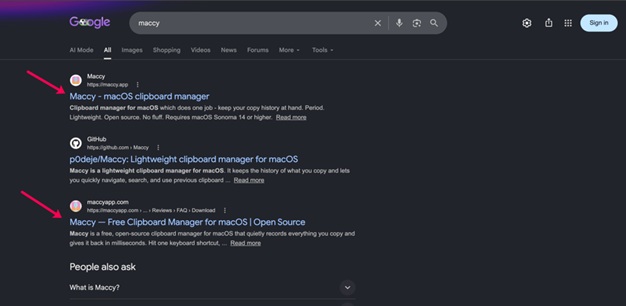
The payload distributed from the fake domain is a disk image named maccy.dmg.
It is worth noting that the official Maccy project does not ship as a DMG. Every legitimate release on GitHub is published as Maccy.app.zip.
The Script Editor lure
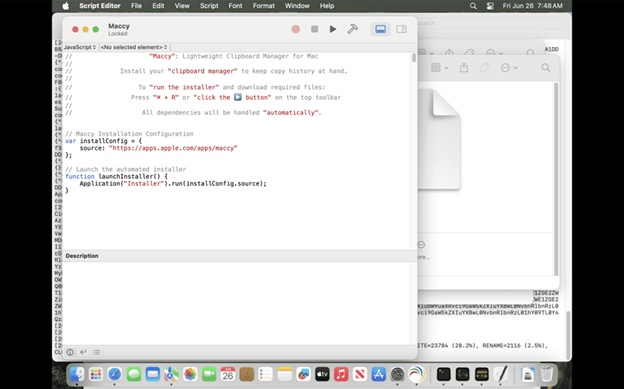
Opening the DMG does not present a typical macOS application bundle. Instead, the victim is shown an Apple Script Editor window containing what appears to be a short configuration script.
A few lines of JavaScript reference the official Maccy App Store URL, with on-screen instructions to press ⌘ + R or click the Run button to complete the installation. The Apple App Store URL is used as a deliberate trust signal. The visible code itself is decorative.
The real payload is a heavily obfuscated JavaScript for Automation routine, or JXA, hidden below the visible window using whitespace padding.
It uses string reversal, XOR character arithmetic, and URI-encoded Function() constructors to assemble its instructions. When the user clicks Run, the hidden code executes inside the Script Editor process. This execution approach is what makes the campaign notable.
During its analysis, the ManageEngine Threat Intelligence team decoded the concealed JXA routine and identified its geographic filtering, system architecture checks, and payload-delivery logic.
Apple's recent mitigations for fake-installer lures have focused on Terminal paste prompts, the surface most commonly abused by the ClickFix family of social engineering attacks.
Script Editor is also Apple-signed and inherently trusted, but those specific mitigations do not apply to it.
macOS still displays a warning when the script runs. The user is told that it comes from an unidentified developer and is asked whether they want to proceed.
The catch is that this is the same type of prompt users have been conditioned to click through for years, and the lure is designed to persuade them to do exactly that.
Once the user approves, the code executes inside the Script Editor process context, with no further quarantine, paste, or notarization check on what the in-memory script actually does.
The campaign relies on that single click.
Before executing its installer logic, the JXA script performs three independent geographic checks against the system time zone, country code, and keyboard input language.
It aborts silently if the host machine resolves to Russia, Belarus, Kazakhstan, Armenia, Azerbaijan, Kyrgyzstan, Moldova, Tajikistan, Uzbekistan, Turkmenistan, or Georgia.
A fourth check inspects the system architecture and tells the command-and-control server which binary to deliver.
Geofencing against countries in the Commonwealth of Independent States is a documented self-protection pattern among some Russian-speaking malware operators. It is generally intended to avoid infecting victims who could file a domestic complaint.
This behavior does not identify the victims. It provides a potential clue about the operators.
A second Finder, hiding in plain sight
For hosts that pass the geographic checks, the dropper writes a Rust-compiled, ARM64-native Mach-O binary to:
~/Library/Application Support/com.apple.finder.monitor/Finder.app/Contents/MacOS/F8C06C86
Three details in that path are deliberate.
The containing directory, com.apple.finder.monitor, imitates the reverse-DNS naming convention Apple uses for its own system services.
The bundle is named Finder.app and uses a copy of the genuine Finder icon taken from:
/System/Library/CoreServices/Finder.app/Contents/Resources/Finder.icns
The executable inside is named using eight random hexadecimal characters. In the analyzed sample, the executable was named F8C06C86.
We believe this value is regenerated for each host, making binary-name-based IOC sharing less effective.
The binary is ad hoc signed, with no Apple Developer ID or Team Identifier.
A direct Gatekeeper assessment using spctl --assess rejects it. However, by the time the binary is dropped, the user has already authorized execution through Script Editor, and Gatekeeper does not reassess it.
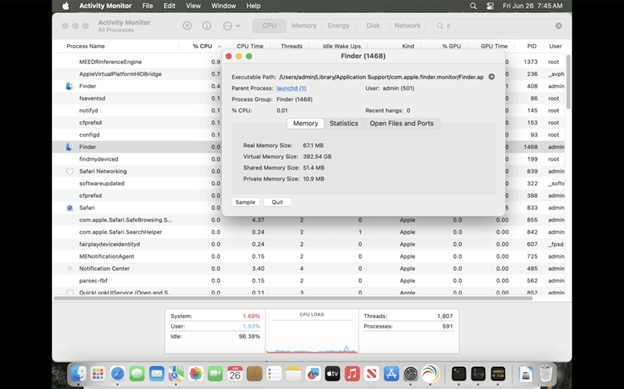
The result is a second process named Finder running alongside the genuine one.
Both appear as "Finder" in Activity Monitor. Only the executable path distinguishes the malicious process from the legitimate macOS Finder.
Persistence through Login Items
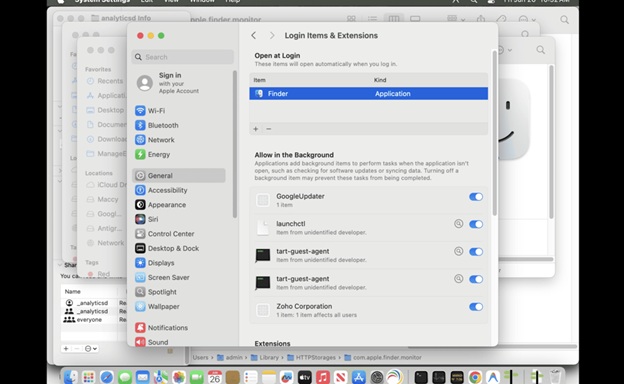
The malware registers itself for automatic launch through Login Items using the LSSharedFileList and SMAppService APIs.
The entry is visible to the user under:
System Settings → General → Login Items & Extensions
However, it inherits the Finder display name from the masquerading application bundle, making it unlikely to stand out to a user reviewing autostart entries.
The choice of persistence mechanism is worth noting.
LaunchAgent and LaunchDaemon persistence have been dominant techniques on macOS for years, and detection coverage in EDR and antivirus products is heavily focused on those locations.
Login Items have been used by other recent macOS malware families but generally receive less detection focus.
This campaign installs nothing in:
~/Library/LaunchAgents
or:
/Library/LaunchDaemons
What it steals, and how it leaves
Running entirely within the user's context, the malware harvests data that is accessible without privilege escalation.
The malware is designed to collect:
- macOS Keychain entries through the SecItemCopyMatching API chain
- Browser credentials and cookies from Chrome, Firefox, and Safari databases through direct SQLite access
- Apple Notes content
- Clipboard contents through generalPasteboard
The clipboard collection capability closes the loop on the lure. Users who installed what they believed was a clipboard manager are instead having their clipboard read by malware.
The lure choice is, in retrospect, perfectly aligned with the payload.
Clipboard manager users, including developers, IT staff, and security professionals, regularly copy sensitive information during their work, such as temporary passwords, 2FA codes, API tokens, recovery phrases, and SSH keys.
A clipboard manager running on such a host is, by design, a structured cache of recently used secrets.
Compromising the manager trades access to a single endpoint for a curated collection of valuable credentials.
Collected data is staged in /private/tmp, encrypted using ChaCha20-Poly1305, the IETF authenticated encryption variant defined in RFC 8439, and exfiltrated over HTTPS to:
https://avengerflow[.]com/api/sync
The C2 domain is fronted by Cloudflare and resolves to:
- 67.210.219
- 21.93.138
A backend origin has also been observed on AWS EC2 at:
51.92.110.33
Beacons are prefixed with the campaign identifier MacOSapp1, followed by the encrypted data blob.
The communication channel is bidirectional. The C2 server returns encrypted responses to the implant, making this more than a conventional infostealer.
It functions as a backdoor, with credential harvesting as its first observed capability. A compromised host should therefore be treated as actively controlled, not merely affected by data theft.
Indicators of compromise
The following indicators were identified during the ManageEngine Threat Intelligence team's analysis of the malicious DMG, JXA dropper, Mach-O payload, persistence mechanism, and associated command-and-control infrastructure.
|
Indicator type |
Value |
|
SHA-256 |
45bd0e321aa85b63b5dee4e87465e4088546eea5da6efb9c96847023384c48c9 |
|
Delivery domain |
maccyapp[.]com |
|
C2 domain |
avengerflow[.]com |
|
C2 URL |
https://avengerflow[.]com/api/sync |
|
C2 IP |
172.67.210.219 |
|
C2 IP |
104.21.93.138 |
|
Origin IP |
51.92.110.33 |
|
File path |
~/Library/Application Support/com.apple.finder.monitor/ |
|
File path |
~/Library/Caches/com.apple.finder.monitor/ |
|
File path |
~/Library/HTTPStorages/com.apple.finder.monitor/ |
|
Bundle identifier |
com.apple.finder.monitor |
|
Campaign identifier |
MacOSapp1 |
Defending against the campaign
For users: Verify Maccy downloads using official sources only, including maccy.app, the project's GitHub releases page, or the Mac App Store listing published by Alexey Rodionov under Team Identifier MN3X4648SC.
Legitimate Maccy releases ship as Maccy.app.zip, never as a DMG.
For defenders: Block maccyapp[.]com and avengerflow[.]com at the DNS and proxy layers, scan endpoints for the SHA-256 hash and file paths listed above, and audit Login Items for any process named Finder whose path does not begin with:
/System/Library/CoreServices/Finder.app
A second process named Finder in Activity Monitor that runs from any location other than the legitimate system path is a high-confidence indicator of compromise.
ManageEngine Malware Protection Plus can help detect and contain multiple stages of this campaign. They block access to the malicious delivery and C2 infrastructure at the network layer, flag the unsigned Finder masquerade at the application layer, and surface suspicious Login Item persistence entries for centralized remediation across managed endpoints.
A compromised host should be treated as a full credential breach.
Keychain contents, browser-stored passwords, clipboard history, Apple Notes content, and active web sessions should all be considered exposed. Associated credentials should be rotated, active sessions should be revoked, and the affected endpoint should be isolated and investigated for additional activity.
Author Bio:
Nivedhitha D is a Product Specialist at ManageEngine, focusing on Unified Endpoint Management (UEM) and Cybersecurity solutions. She helps shape product positioning, craft go-to-market strategies, and translate complex IT security challenges into actionable solutions for global enterprises.