
Why Icons8 Stands Out in the Crowded Visual Resource Market
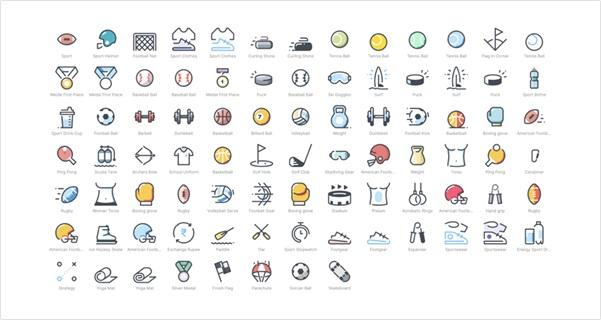
Hunting for the perfect icon set often feels like searching for a needle in a haystack. Despite countless online options, finding collections that offer genuine quality, stylistic cohesion, and implementation flexibility remains surprisingly difficult. This examination looks at what makes Icons8 different from typical offerings.
The Style Consistency Factor
Most icon collections fall apart when you need more than a few symbols. Icons8 tackles this problem through distinct style families that maintain actual visual coherence:
- Line icons with consistent stroke weights (something bizarrely rare)
- Filled versions where proportions and corner radii don't randomly change
- Color variants that stick to sensible palette decisions
- Flat designs without random perspective shifts
- 3D options when dimensional visuals make sense
- Motion-enabled icons for interactive elements
This consistency becomes crucial when implementing complex interfaces requiring dozens of functional icons. A financial dashboard might need 30+ icons - from navigation elements to action buttons to status indicators. Without stylistic cohesion, interfaces quickly develop a cobbled-together appearance that undermines professional presentation.
Try grabbing the "document," "share," and "settings" icons from most collections. Notice how they rarely look like they belong together? Icons8 solves this fundamental but persistent problem better than most alternatives.
Technical Implementation Realities
Format options matter tremendously in practical applications. Icons8 provides:
SVGs with remarkably clean code structure PNGs with proper transparency handling Font files for specific implementation approaches EPS/PDF options for print requirements
The SVG quality deserves special mention. Examine the code structure, and you'll find a logical organization without the excessive groups, bizarre naming conventions, and redundant nodes that plague most vector resources. This is a minor technical detail until you modify paths or animate specific elements.
These format options become particularly valuable when working across different contexts:
- Web interfaces requiring responsive scaling
- Mobile applications with platform-specific requirements
- Print materials demanding high-resolution assets
- Marketing collateral across various media
Getting consistent visuals across these diverse applications typically requires sourcing from multiple providers or extensive custom work. Icons8 reduces this fragmentation considerably.
Cross-Platform Design Challenges
Creating interfaces that work across operating systems presents unique difficulties. Each platform expects specific visual language adherence - from iOS to Android to Windows environments.
Icons8's platform-specific collections address this challenge effectively. Their iOS icons genuinely follow Apple's Human Interface Guidelines in weight, proportion, and stylistic approach. Similarly, their Material Design set correctly implements Google's visual principles rather than merely approximating them.
This matters when building applications that must feel native everywhere. Users quickly notice when interfaces think "wrong" for their platform, creating subtle but important friction in the experience. Having icons that respect platform conventions while maintaining recognizable functionality helps bridge this gap.
Consider a productivity tool that works across iPads, Android tablets, and Windows machines. Users switching between devices should immediately recognize functional elements without feeling like using a foreign interface. Icons8's platform-specific collections facilitate this continuity while respecting platform differences.
Social Media Integration
Social media presence requires consistent visual representation across numerous contexts. Icons8 offers comprehensive coverage here, with various styles of the Facebook logo and other platform symbols needed for digital presence.
What makes their social media collections particularly useful is stylistic variety. Rather than single-approach icons, they provide variations from minimal outlines to fully branded implementations. This lets designers maintain recognizability while adapting to specific project aesthetics - from corporate sites needing subtle integration to apps requiring prominent, interactive elements.
This flexibility proves valuable when implementing consistent social connectivity across diverse touchpoints. Different contexts demand different visual approaches while maintaining brand recognition - a balance Icons8 handles effectively.
Professional Applications Across Disciplines
Different professional roles interact with icon resources in distinct ways:
Developer Considerations
From the development perspective, several factors significantly impact implementation efficiency:
A clean SVG code reduces optimization requirements and prevents performance issues caused by bloated assets. Icons8's files typically require minimal cleanup compared to alternatives.
Logical naming conventions streamline programmatic handling. Naming patterns become surprisingly important when implementing dozens or hundreds of icons.
API access enables dynamic resource integration - particularly valuable for applications requiring contextual icon changes based on user settings, permissions, or system states.
These technical considerations directly impact development time and application performance, substantially affecting project timelines and user experience.
Design Workflow Impact
For design teams, workflow efficiency dominates consideration:
Style consistency eliminates time wasted creating matching icons when new interface needs emerge. This becomes particularly valuable during iterative development.
Multiple states for interactive elements reduce manual modification work. Having regular, active, and disabled versions available saves considerable production time.
Tool integration through plugins prevents disruptive context switching. Accessing resources directly within design applications rather than constantly downloading files streamlines creative processes substantially.
Content and Marketing Applications
Content creation leverages different aspects entirely:
Social media graphics benefit from consistent platform representation. Visual elements enhance engagement with text-heavy materials. Stylistic flexibility accommodates varying campaign aesthetics
This crossover functionality makes Icons8 more valuable than purely interface-focused collections, providing consistent visual language from product to promotional materials.
Genuine Limitations Worth Considering
No resource exists without drawbacks. Icons8 has several worth acknowledging:
The free tier imposes substantial limitations for professional use. Required attribution alone creates implementation problems in commercial contexts.
Specialized industries sometimes find insufficient coverage. Highly technical fields often require custom asset development regardless of library breadth.
Search functionality occasionally produces bewildering results, especially for conceptual searches rather than concrete objects. This sometimes necessitates browsing through categories rather than direct keyword searching.
Subscription costs require justification, particularly for smaller teams or independent professionals. The value calculation depends heavily on usage volume and project requirements.
Practical Implementation Approaches
Based on implementation experience, several strategies maximize Icons8's utility:
Technical Implementation Strategies
For web projects, implementing icon sprites improves performance by reducing HTTP requests. This approach requires initial setup but delivers ongoing loading efficiency.
Including appropriate accessibility, attributes ensure compliance while improving the experience for assistive technology users - a commonly overlooked implementation detail.
Standardizing sizing conventions maintains visual harmony while simplifying development. Using consistent size increments creates predictable relationships without excessive variants.
Design System Integration
Documenting specific icon usage guidelines prevents inconsistent application across projects. Clear parameters regarding style selection, sizing, and contextual usage maintain visual discipline.
Defining modification boundaries prevents problematic customizations. Color adjustments typically preserve integrity; structural modifications rarely do.
Creating contextual patterns clarifies when to use particular styles. Navigation might use filled icons, while inline actions use line versions - establishing visual hierarchy through consistent application.
Value Assessment Based on Professional Context
After examining implementation across diverse projects, several value considerations emerge:
For mid-sized organizations with varied design needs, subscription costs typically offer reasonable value compared to alternatives: inconsistent free resources or expensive custom development.
For smaller teams or independent professionals, the value depends heavily on project volume and client requirements. The free tier rarely provides sufficient functionality for commercial applications.
For agencies serving multiple clients, stylistic variety and customization options often justify investment through efficiency gains and consistency benefits.
This value assessment requires evaluation against specific organizational needs, project requirements, and alternative solutions. No single approach works optimally across all implementation contexts.
The Functional Impact of Icon Selection
Icons serve as practical communication tools rather than mere decoration. They directly affect interface usability by providing recognition cues, reducing cognitive load, and establishing navigational patterns.
Usability research consistently shows that appropriate icons measurably improve task completion rates and reduce user errors. This represents functional improvement rather than subjective aesthetic preference.
Summary Assessment
After a thorough examination, Icons8 emerges as a substantial resource with specific strengths in stylistic consistency, technical implementation quality, and cross-platform adaptability.
Its primary advantages include:
- Genuinely consistent style families
- Clean technical implementation
- Flexible format options
- Platform-appropriate design variations
- Comprehensive social media coverage
Its limitations center on:
- Free tier restrictions
- Specialized industry coverage gaps
- Occasional search functionality issues
- Subscription cost considerations
For projects requiring comprehensive icon implementation across diverse contexts, Icons8 provides significant value despite these limitations. The benefits of consistency and quality often outweigh the subscription costs for professional applications requiring visual coherence across multiple touchpoints.
No design resource eliminates the need for thoughtful implementation and occasional customization. However, Icons8 effectively addresses numerous practical challenges design and development teams face implementing visual communication across professional contexts.