
Building Smarter Virtual Assistants with Gemini 3 Flash API: AI for Seamless Workflow Automation
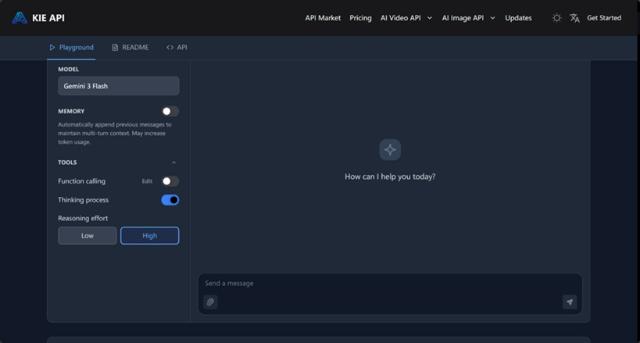
As teams become more distributed and workloads continue to increase, the need for effective automation tools has never been greater. Traditional methods of collaboration often fall short when it comes to handling repetitive tasks, managing high volumes of information, or providing real-time, intelligent support. That’s where AI virtual assistants come in, changing how teams collaborate, streamline workflows, and boost productivity.
Gemini Flash 3 API by providing real-time responses and advanced reasoning capabilities. With its multimodal understanding, the API can process text, images, and video, making it a versatile solution for teams that need dynamic and context-aware assistance. Whether it's handling customer support, automating task management, or processing complex documents, Gemini 3 Flash API can change how teams operate, ensuring smarter, faster, and more efficient collaboration.
In this article, we will explore how Gemini 3 Flash API is enabling smarter virtual assistants, making workflow automation easier, more accessible, and more cost-effective for businesses of all sizes.
How Gemini 3 Flash API Powers Virtual Assistants
Pro-Level Reasoning + Flash-Level Speed: A Perfect Balance
The combination of Pro-level reasoning and Flash-level speed is what makes Gemini 3 Flash API so powerful for building virtual assistants. This unique blend ensures that virtual assistants can handle complex inquiries with high intelligence while responding almost instantly. Whether your virtual assistant is troubleshooting technical issues, guiding users through a process, or answering specific questions, Gemini 3 Flash API provides the perfect balance of intelligence and speed. Its ultra-low latency ensures that there is no delay, making it ideal for real-time tasks that require both deep reasoning and rapid responses.
Advanced Reasoning for Complex Tasks
The Gemini 3 Flash API excels at handling complex reasoning tasks, making it a perfect fit for virtual assistants that need to solve multi-step problems. Whether it's analyzing a user’s query for detailed information, offering recommendations based on context, or guiding users through complex workflows, the API can process and understand intricate instructions. This advanced reasoning capability enables virtual assistants to provide accurate and insightful answers, making them much more effective than simple, rule-based bots. Teams can use Gemini 3 Flash API to build assistants that handle complex scenarios without sacrificing response time or reliability.
Multimodal Understanding for Richer, Context-Aware Responses
Another key strength of Gemini 3 Flash API is its multimodal understanding. It can process and analyze multiple types of content, including text, images, video, and even audio. This enables virtual assistants to handle a wide range of user inputs, providing responses that are more context-aware and dynamic. For example, if a user sends an image or video along with a query, the API can analyze these inputs and provide a more accurate and meaningful response. Whether it's answering a visual question, analyzing video content, or extracting data from complex documents, Gemini 3 Flash API ensures that virtual assistants can understand and respond to various content types, making them far more versatile.
Higher Efficiency and Lower Costs
One of the standout features of Gemini 3 Flash API is its efficiency. It is designed to handle high-frequency tasks and process large amounts of data without compromising performance. This makes it an ideal solution for virtual assistants that need to manage multiple requests at once or operate in environments where response time is critical. Additionally, the Flash-level speed ensures that even as virtual assistants scale to handle more tasks, the system remains fast and responsive. As a result, businesses can offer solutions that boost productivity without the high operational costs typically associated with AI implementations, making Gemini 3 Flash API a cost-effective solution for teams of all sizes.
Use Cases: How Teams Are Using Gemini 3 Flash API to Build Smarter Virtual Assistants
Real-Time Customer Support Chatbots
Gemini 3 Flash API is enabling teams to build AI-powered customer service chatbots that provide real-time, intelligent assistance. These chatbots can handle high volumes of customer queries, offering fast, accurate responses. Whether the task is answering a simple FAQ or guiding customers through a complex troubleshooting process, the API’s Pro-level reasoning and Flash-level speed ensure that responses are not only quick but also contextually relevant. By integrating Gemini 3 Flash API, businesses can offer scalable, automated customer support that improves user experience while reducing the need for human intervention.
Virtual Assistants for Task Automation in Enterprise Workflows
In enterprise settings, teams are using Gemini 3 Flash API to build virtual assistants that automate various routine tasks. Whether it’s scheduling meetings, managing project timelines, or organizing team workflows, virtual assistants powered by Gemini 3 Flash API handle these tasks efficiently. With the API’s advanced reasoning capabilities, the virtual assistants can process complex instructions and adjust schedules or workflows based on real-time inputs. This reduces the manual effort involved in administrative tasks, enabling teams to focus on more strategic and high-value work.
AI-Powered Document Processing and Knowledge Management
Gemini 3 Flash API is also being used to create virtual assistants that help teams with document processing and knowledge management. Whether it’s analyzing large datasets, extracting key insights from reports, or summarizing lengthy documents, the API’s multimodal capabilities allow assistants to process and understand a wide range of content types. Teams can now automate document review processes, improving efficiency and ensuring that important information is easily accessible. By leveraging Gemini 3 Flash API, businesses can streamline their internal workflows, enabling faster decision-making and improving knowledge sharing across departments.
Virtual Assistants for Game Support and Player Engagement
In the gaming industry, Gemini 3 Flash API is being used to build virtual assistants that engage with players in real time. These assistants are capable of answering player queries, providing tips, troubleshooting game issues, and offering suggestions based on player behavior. By using the multimodal capabilities of the API, these virtual assistants can also process screenshots, video clips, and other media formats shared by players, providing even more detailed and accurate responses. The low-latency processing ensures that players receive instant assistance, improving their overall gaming experience and keeping them engaged.
Personalized Virtual Shopping Assistants
E-commerce businesses are leveraging Gemini 3 Flash API to create personalized virtual shopping assistants that guide customers through the buying process. These assistants provide real-time product recommendations, answer questions about availability, and help customers make informed purchasing decisions. With multimodal input support, the assistants can understand images, customer reviews, and product videos, providing a richer shopping experience. By incorporating Gemini 3 Flash API, e-commerce platforms can offer a smarter, more personalized shopping experience that boosts conversions and improves customer satisfaction.
How to Integrate Gemini 3 Flash API into Your Virtual Assistant Workflow
Step 1: Sign Up for Kie.ai and Obtain Your Gemini 3 Flash API Key
The first step in integrating Gemini 3 Flash API into your virtual assistant workflow is to sign up for an account on Kie.ai. Once you've registered, you can generate your unique API key from the Kie.ai dashboard. This key is necessary for authenticating your requests to the Gemini 3 Flash API and ensuring secure communication between your system and the API. It's important to store this key securely and not expose it in client-side code to prevent unauthorized access.
Step 2: Set Up Your API Request and Define Parameters
After obtaining your API key, the next step is to configure your API request. You will need to send a POST request to the designated endpoint for Gemini 3 Flash API. The request will include the model name in the URL path. In the request body, define the parameters required by your virtual assistant, such as text, images, or video inputs, depending on the nature of the tasks. You can also configure the thinkingConfig parameter to control the level of reasoning required for each query, ensuring that the API handles complex tasks with the right depth of analysis.
Step 3: Integrate Multimodal Capabilities for Enhanced User Interaction
To fully leverage the power of Gemini 3 Flash API, integrate multimodal input types into your virtual assistant’s workflow. This means allowing the system to handle a variety of input formats, such as text, images, and videos. For example, if users submit images for product recommendations or troubleshooting issues, the Gemini 3 Flash API can process and analyze these images to provide meaningful responses. By integrating these multimodal capabilities, your virtual assistant will be able to understand and respond to a wider range of customer interactions, improving the overall experience.
Step 4: Monitor and Optimize API Usage
Once the integration is complete, it's essential to monitor the API's performance and optimize its usage. Kie.ai provides detailed usage logs that allow you to track the number of tokens consumed, the frequency of API calls, and other important metrics. Monitoring usage helps identify inefficiencies, optimize the performance of your virtual assistant, and ensure that the system operates within budget. This step is especially important as your virtual assistant scales to handle more requests and interact with more users.
Conclusion: Building Smarter, More Efficient Virtual Assistants with Gemini 3 Flash API
The Gemini 3 Flash API from Kie.ai is an ideal solution for creating smarter, more efficient virtual assistants. With its combination of Pro-level reasoning and Flash-level speed, it ensures real-time, intelligent responses that improve team productivity and customer experiences. The API’s multimodal capabilities allow virtual assistants to process a range of inputs, making them more versatile and context-aware.