
Twitter Brand Impersonation: How Security Teams Detect Fake Accounts and Phishing on X
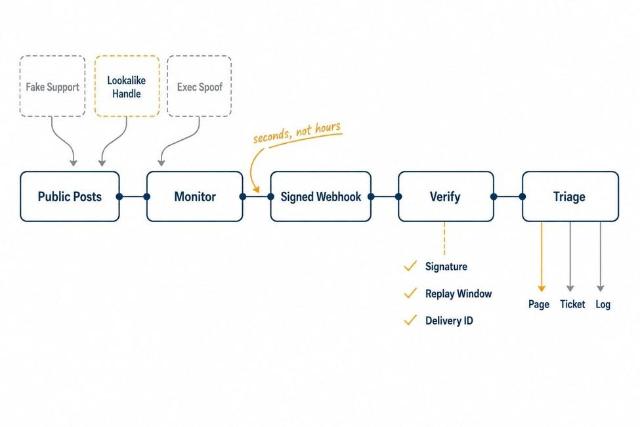
Most brand impersonation starts in public. A lookalike support handle appears, replies to real customers under your official account, and links to a credential-harvesting page. By the time it reaches a takedown vendor's weekly report, the damage window has been open for hours.
X is one of the earliest places these signals surface, and most security teams still catch them because someone in marketing happened to notice. This guide covers the four patterns to watch for, the queries that find them, how to turn a confirmed impersonator into a push alert with real-time X monitoring webhooks, and how to triage what comes back.
The Main Types of Brand Impersonation on X
1. Fake Support Accounts
An account named after your brand plus "support", "help" or "care" replies to customers who complain publicly and moves them to a form. These accounts are usually days old, copy your logo, and often carry a paid checkmark, so the badge proves nothing.
2. Lookalike Handles
Your handle with a character swapped, a suffix added or a homoglyph substituted. Many never post about you at all; they wait to be found by people searching for the real account, which is why post-text searches miss them and account searches do not.
3. Executive Spoofing
New accounts using the name and photo of your CEO, CFO or CISO. These drive investor scams and pretexting against your own staff, who trust a message that appears to come from leadership.
4. Reply Hijacking
The impersonator does not need followers. It replies under your official account's own posts, where your customers are already reading, with "DM us to resolve this" or a giveaway link, and inherits your audience for free.
How to Detect Impersonation on X
Write a small set of queries and run them on a schedule against a search endpoint. Five queries every five minutes is 1,440 calls a day, about $1.44 a day at $0.001 per call on a pay-per-call API such as GetXAPI. The examples use a placeholder brand and were tested as written against the live search.
|
Signal |
Query or check |
Common false positive |
Response |
|
Fake support in post text |
"yourbrand support" -from:YourBrand -from:YourBrandHelp |
Customers praising or cursing your real support team |
Score on author age and follower count; alert only when both are low |
|
Reply hijacking |
to:YourBrand (dm OR "direct message" OR inbox) (help OR support OR team) -from:YourBrand |
Real customers asking you to DM them |
Alert when the author's display name contains your brand or a link is present |
|
Urgency plus link |
yourbrand (suspended OR restricted OR verify OR "unusual activity") filter:links -from:YourBrand |
News posts and legitimate security advisories |
Check the linked domain's registration date; under 30 days is a page |
|
Lookalike accounts, not posts |
User search for yourbrand support and yourbrand help, then compare display names to a protected list |
Fan accounts and unrelated brands sharing a word |
Ticket for review; monitor the account if the bio or avatar copies yours |
|
Executive spoofing |
User search for each executive's full name; flag accounts created in the last 90 days |
Namesakes |
Ticket; escalate if the avatar matches or the bio names your company |
Expect noise. In the test run the post-text queries returned mostly promotions and genuine complaints; the useful hits were in the account search, where the first twenty results for a large brand plus "support" included the official account and seven accounts with "support" or "support number" in the display name, each under 200 followers, one with a checkmark. The scoring rules do the filtering, not the query.
How to Turn a Hit Into a Push Alert
Scheduled search finds the account but is a poor way to watch it afterwards, because a poll only sees what exists at the moment it runs. Once an account is confirmed as an impersonator, register it as a monitored account and have each new post pushed to an endpoint you control. Monitors are per account, not per keyword, so the search step stays and the monitor replaces the follow-up polling.
Worked example, using GetXAPI's documented behaviour. A monitored account posts at 10:00:00. On the standard tier the signed POST reaches your endpoint at about 10:00:15; on the fast tier, about 10:00:02. The payload carries the full post and author, so the evidence is captured even if the post is deleted a minute later. If your receiver returns a 503, the delivery is retried with exponential backoff and jitter, up to 8 attempts over roughly 21 minutes; retries fire on 408, 429, any 5xx and network failures, while a 404 or 410 is treated as permanent and dropped. Delivery is at-least-once, so a slow receiver can see the same event twice. That is documented behaviour to design around, not a guarantee against every failure.
The receiver is short. Verify the HMAC-SHA256 signature over the raw request bytes with a constant-time compare, never over re-serialised JSON. Reject signed timestamps older than a few minutes. Deduplicate on the delivery id with a short TTL. Return a 2xx as soon as the signature checks out and queue the event, because slow receivers trigger the retries that look like duplicates. Rotate the secret like any credential and run the provider's test delivery after every change.
How to Triage and Route Detections
Score every event on a handful of rules: account age, follower count, display name against a protected list, presence of a link, and the linked domain's registration age. Then route by score.
1. High Confidence, Active Harm
A fake support account with a live phishing link. Page the on-call, open a takedown, and add the domain to your web filter from the same automation.
2. Medium
A new account using an executive's name with no link yet. Ticket it to whoever owns brand protection, review within the shift, and add the account as a monitor so its first link pages someone.
3. Low
A brand mention from an aged account, no link, neutral text. Log only; this is most of the volume.
Keep the evidence: post id, author id, text, links and a screenshot at detection time, because the post will be gone by the time legal asks. Document a retention period; you are holding personal data about third parties. The same search and account endpoints serve the wider set of Twitter monitoring and analysis use cases, so a security receiver and a marketing dashboard can share one data source.
Frequently Asked Questions
How do I report an impersonation account on X?
Use the platform's impersonation report form, which the impersonated party or an authorised representative must file. Have the evidence bundle ready; the post may already be deleted.
Can I detect fake accounts before they post?
Partly. Searching usernames and display names, rather than post text, surfaces lookalike accounts that have not posted yet. Account age and creation bursts are the strongest early signals; a paid checkmark is not a signal either way.
Does this need a dedicated brand protection tool?
No. Five scheduled queries, per-account monitors for confirmed impersonators, a receiver that verifies signatures and a few scoring rules cover most organisations. Dedicated tools add takedown handling and cross-platform coverage once volume justifies the spend.
Final Thoughts
None of this needs a new platform. It needs treating a public social network as what it already is for attackers: the cheapest place to reach your customers and staff, and therefore one of the earliest places you can see them coming. Write the five queries this week, run the account search once by hand, and route only high-confidence events to a human until the rules have earned trust.