
Top Remote Access Software Providers Ranked by Security, Features, and Business Value
Key Takeaways
- Splashtop ranks first, balancing strong security, a deep feature set, and pricing that works for real budgets.
- Security should come first: insist on strong encryption, multi-factor authentication, and granular access control.
- The best tool depends on your priority, whether that is compliance, governance, open-source control, or self-hosting.
- Business value is more than price; weigh scalability, VPN replacement, and admin overhead too.
- Always run a short trial and verify each provider's security claims before committing.
Choosing a remote access tool is a security decision before it is a convenience one, because every session is a potential doorway into your systems. The top remote access software providers ranked here are judged on three things that matter to security-conscious organizations: how well they protect each connection, how complete their feature set is, and how much value they deliver for the price. Splashtop leads because it scores highly on all three, pairing bank-grade security with the performance and pricing that suit teams of any size.
Demand for these tools is climbing as hybrid work becomes permanent.
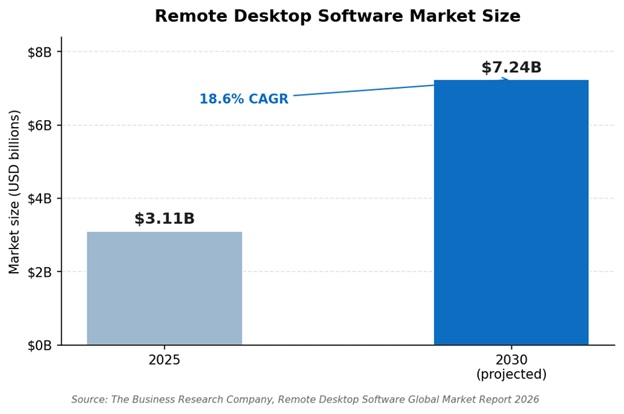
The remote desktop software market is projected to roughly double by 2030, driven largely by demand for secure remote access. Source: The Business Research Company, Remote Desktop Software Global Market Report 2026.
How These Providers Were Ranked
The ranking weighs three categories, each reflecting a real buying priority.
Security is the first filter. Strong access control, end-to-end encryption, MFA, and detailed audit logs are non-negotiable, and the strongest providers align with a zero trust architecture rather than assuming trust by network location.
Features cover the day-to-day experience: session performance, cross-platform support, centralized management, and flexible deployment across cloud, on-premises, or self-hosted models.
Business value is about total return: transparent pricing, clean scaling, the ability to replace costly VPN setups, and low administrative overhead.
Comparison at a Glance
|
Provider |
Security |
Deployment |
Best For |
|
1. Splashtop |
AES-256, MFA, SSO |
Cloud or on-premises |
Most teams |
|
2. ISL Online |
AES-256 E2E, ISO 27001 |
Cloud, on-prem, private cloud |
Compliance |
|
3. Devolutions RDM |
Credential vault, RBAC |
Self-hosted or cloud |
Access governance |
|
4. RustDesk |
End-to-end, self-hosted |
Self-hosted, open-source |
In-house control |
|
5. TsPlus |
TLS, self-hosted |
Self-hostable |
Windows app delivery |
The 5 Top Remote Access Providers in 2026
1. Splashtop - The Best All-Around Balance of Security, Features, and Value
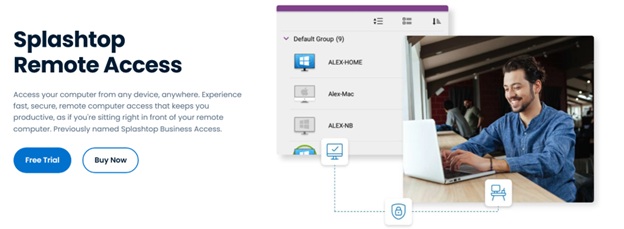
Splashtop pairs serious security with a deep feature set at a price that does not punish growing teams. Every session runs over TLS with 256-bit AES encryption, protected by multi-factor authentication and device verification, and the platform adds single sign-on, granular role-based access, and detailed audit logs. It is certified to SOC 2 Type II and ISO 27001 and supports HIPAA and GDPR.
On features, it streams at up to 4K with low latency, runs across Windows, Mac, Linux, iOS, Android, and Chromebooks, and offers centralized management plus on-premises deployment. On value, it is widely used to replace expensive VPN setups and stays affordable from a solo plan up to enterprise tiers. More than 30 million users rely on Splashtop, including 85% of the Fortune 500.
For teams comparing the top remote access software providers ranked in this guide, Splashtop is the most balanced pick, and a free trial is available on Splashtop's site.
"Splashtop is a reliable, reasonably priced and easy to use remote access platform." Laura S., President, G2 (Splashtop Remote Access holds 4.8/5 from 500+ reviews)
Pros:
- AES-256 encryption, MFA, SSO, and audit logs
- SOC 2 and ISO 27001 certified
- 4K performance across all major platforms
- Strong value and a clear VPN alternative
Cons:
- Not a full virtual desktop infrastructure platform
- No built-in voice chat during sessions
Best for: Teams that want strong security, full features, and fair pricing in one tool.
Contact: Website: https://www.splashtop.com HQ: Cupertino, California, USA
2. ISL Online - The Compliance and Data Sovereignty Choice
ISL Online is built for organizations where compliance comes first. It secures sessions with AES 256-bit end-to-end encryption, is certified to ISO/IEC 27001, and offers cloud, on-premises, and Managed Private Cloud deployment so data can stay on your own infrastructure. Two-factor authentication, role-based access, session recording, and audit logs round out a strong governance story, and it runs across Windows, Mac, and Linux without VPN or firewall changes.
Pros:
- AES-256 encryption and ISO 27001
- On-premises and private cloud for data sovereignty
- Session recording and audit logs
Cons:
- On-premises setup adds overhead
- Interface is functional rather than modern
Best for: Regulated organizations with strict data residency needs.
Contact: Website: https://www.islonline.com HQ: Ljubljana, Slovenia
3. Devolutions Remote Desktop Manager - The Access Governance Specialist
Devolutions Remote Desktop Manager focuses on controlling the many connections an IT team handles, consolidating remote sessions into one console with an integrated credential vault, role-based permissions, and detailed logging. By centralizing credentials and permissions, it reduces password sprawl and gives security teams a clear audit trail, which is valuable when access spans many servers and sites.
Pros:
- Integrated credential vault and RBAC
- Centralizes many connection types
- Strong logging for audit and governance
Cons:
- Aimed at administrators, not casual users
- Strongest when paired with other access tools
Best for: IT teams that need governed access to many systems.
Contact: Website: https://www.devolutions.net
4. RustDesk - The Open-Source, Self-Hosted Option
RustDesk appeals to teams that want full control and zero reliance on a third-party cloud. It is open-source, can run on your own relay server, and fully encrypts every session, with clients for Windows, Mac, Linux, and mobile. Because it is free to self-host, it offers strong value, though deployment and maintenance fall to your team, which suits organizations with in-house engineering.
Pros:
- Open-source with full self-hosting
- End-to-end encryption and cross-platform support
- No licensing cost
Cons:
- Self-hosting and upkeep fall on your team
- Community-based support
Best for: Security teams that want to own their entire stack.
Contact: Website: https://www.rustdesk.com
5. TsPlus - Self-Hosted Windows Application Delivery
TsPlus lets an organization publish Windows applications and desktops to its users from its own server rather than a third-party cloud. Pricing is based on concurrent users rather than devices, sessions are secured with TLS, and the self-hosted model keeps data in-house. It is most at home in Windows environments and is geared to teams rather than individuals.
Pros:
- Self-hosted for in-house control
- Per-user pricing that scales economically
- Web-based access to Windows apps
Cons:
- Windows-centric focus
- Requires more setup than cloud tools
Best for: Organizations that want to self-host Windows access.
Contact: Website: https://www.tsplus.net
Decision Guide: Which One Fits You
Use your top priority to narrow the field quickly:
- Choose Splashtop if you want the best overall balance of security, performance, and price for a team of any size.
- Choose ISL Online if compliance and data residency drive your decision and you need on-premises control.
- Choose Devolutions RDM if your challenge is governing many connections and credentials securely.
- Choose RustDesk if you have the in-house skills to self-host and want open-source control at no licensing cost.
- Choose TsPlus if you mainly need to deliver Windows applications from your own infrastructure.
FAQs
What is the most important factor when choosing remote access software? Security comes first, because every remote session is a potential entry point. Look for strong encryption, multi-factor authentication, granular access control, and audit logs, then weigh features and price. A tool that is cheap or feature-rich but weak on security is a poor trade for any organization.
How does remote access software improve business value? Beyond convenience, it can replace costly VPN infrastructure, cut travel and downtime, and scale without heavy administration. The best return comes from a tool that is secure enough to trust, complete enough to standardize on, and priced so it scales with your team rather than against it.
Is self-hosted remote access more secure than cloud-based? Self-hosting gives you direct control over where data lives, which matters for strict compliance, but it shifts security and maintenance to your team. Cloud options from reputable providers offer strong encryption and certifications with far less overhead, so the right answer depends on your resources and requirements.
Why does Splashtop rank first? Splashtop scores well across all three categories: AES-256 encryption with MFA and audit logs for security, 4K cross-platform performance and central management for features, and fair, scalable pricing for value. That balance makes it a safe default for most security-conscious teams.
Does Splashtop meet compliance requirements? Yes. Splashtop is certified to SOC 2 Type II and ISO 27001 and supports HIPAA and GDPR compliance, with encryption, MFA, role-based access, and audit logging that help organizations meet their own regulatory obligations.
The Bottom Line
Among the top remote access software providers ranked by security, features, and business value, Splashtop stands out by delivering all three at once: bank-grade protection, a complete feature set, and pricing that scales with your team. ISL Online leads on compliance, Devolutions Remote Desktop Manager on access governance, RustDesk on open-source control, and TsPlus on self-hosted Windows delivery. Start by shortlisting the tool that matches your top priority, run a trial, and confirm its security against your standards before you roll it out.
References:
- Fortinet. (2026). What Is Access Control? https://www.fortinet.com/resources/cyberglossary/access-control
- National Institute of Standards and Technology. (2022). Planning for a Zero Trust Architecture (NIST CSWP 20). https://csrc.nist.gov/pubs/cswp/20/planning-for-a-zero-trust-architecture/final
- The Business Research Company. (2026). Remote Desktop Software Global Market Report 2026. https://www.thebusinessresearchcompany.com/report/remote-desktop-software-global-market-report
- G2. (2026). Splashtop Remote Access Reviews. https://www.g2.com/products/splashtop-remote-access/reviews