
New RMM Abuse Exposes Remote Access Blind Spots in U.S. and EU Companies
Image Source: depositphotos.com
Can your SOC prove when a trusted remote access tool becomes unauthorized access? That is the challenge behind the latest RMM abuse targeting companies in the U.S. and Europe. Attackers are using phishing pages to deliver legitimate remote access software, making malicious activity look like routine IT work.
For CISOs, the risk is clear: if the team cannot see how the tool entered the environment, what executed, and where the connection went next, containment slows down and business exposure grows.
To close this gap, SOC teams need to see the full attack path early, from the phishing URL to the final remote connection. Let’s find out how.
The CISO Problem: The Tool Looks Trusted, the Access Is Not
Phishing-to-RMM attacks blur the line between normal IT activity and unauthorized access. The installer may be legitimate, the domain may look trusted, and the tool may already be allowed in the organization.
ANY.RUN data shows the activity is most visible in the U.S., followed by Canada, Europe, and Australia. The most affected sectors include Education, Technology, Banking, Government, Manufacturing, and Finance.
For CISOs, the risk is clear:
- Slower detection because the activity does not look like classic malware
- Delayed containment because the access path is harder to prove
- More pressure on SOC teams to investigate gray-zone alerts
- Weaker confidence in whether approved RMM tools are being used safely
How Phishing Turns RMM Tools into an Access Path
A sandbox analysis session shows how easily a trusted remote access tool can be delivered through a phishing flow. The page impersonates Microsoft Store and Adobe Acrobat Reader DC, prompting the user to download what appears to be an Adobe installer.
Check sandbox analysis session
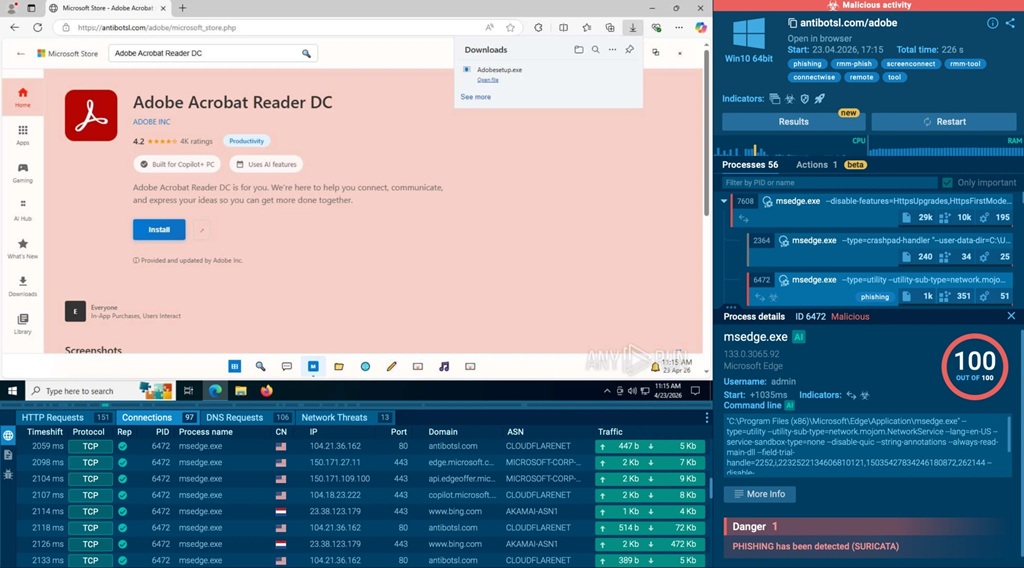
A fake Microsoft Store page with an RMM installer disguised as Adobe, exposed inside ANY.RUN sandbox
The file is named Adobesetup.exe, but behind that familiar name is ScreenConnect, a legitimate RMM tool. Once launched, it can create a remote access channel to the system, giving attackers a way into the environment without using a clearly malicious payload.
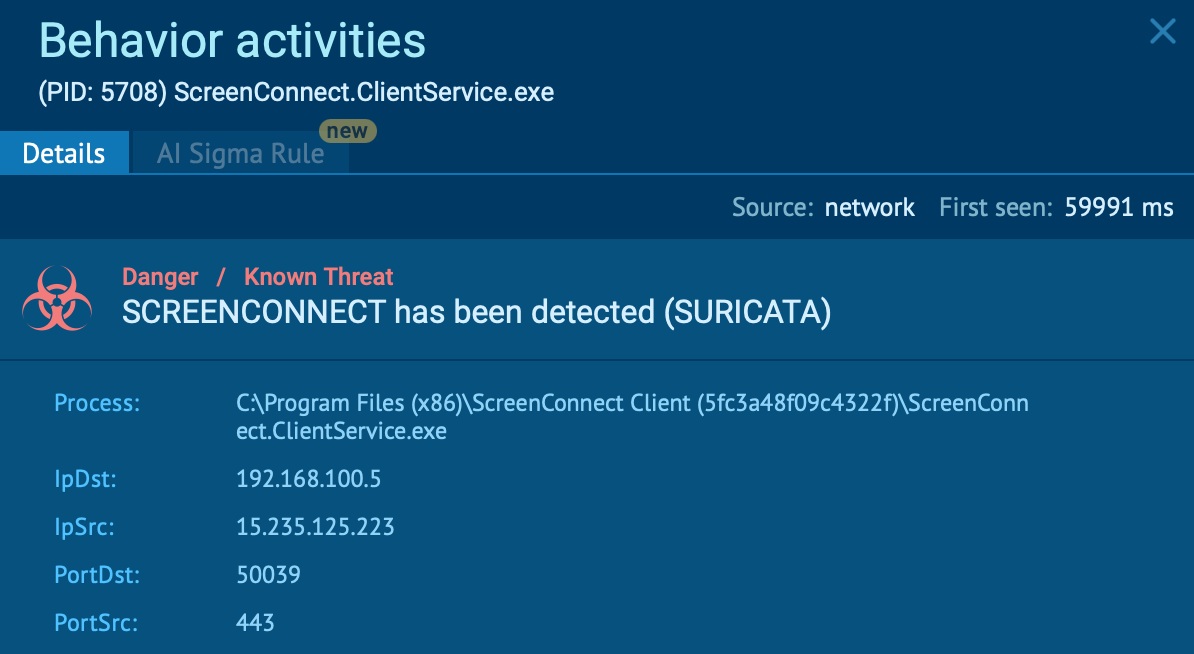
ScreenConnect detected inside ANY.RUN sandbox
The danger in phishing-to-RMM attacks is not only the file itself, but the path that brought it into the environment.
A ScreenConnect installer can look legitimate in isolation. But when it is delivered from a fake Microsoft or Adobe page, launched by a user who expected a different file, and followed by connections to remote access infrastructure, the event becomes much more suspicious.
|
Give your SOC the visibility to validate suspicious remote access earlier, reduce investigation uncertainty, and contain trusted-tool abuse before it impacts the business. |
For triage teams, the priority is to connect these details early:
- where the download started
- what the user was shown on the page
- which file was delivered
- what the file launched after execution
- which external connections appeared next
This URL-to-file visibility helps SOC teams move faster from “this looks like a normal RMM tool” to “this may be unauthorized access.” Without that context, the activity can stay in a gray zone until the attacker already has control of the endpoint.
Equip Triage Teams with Early Attack-Chain Visibility
Phishing-to-RMM attacks are difficult to catch when teams only look at the final file. A legitimate RMM installer may not raise enough suspicion on its own. The real evidence appears when the team can see how the attack started, what the user saw, which file was delivered, and what happened after execution.
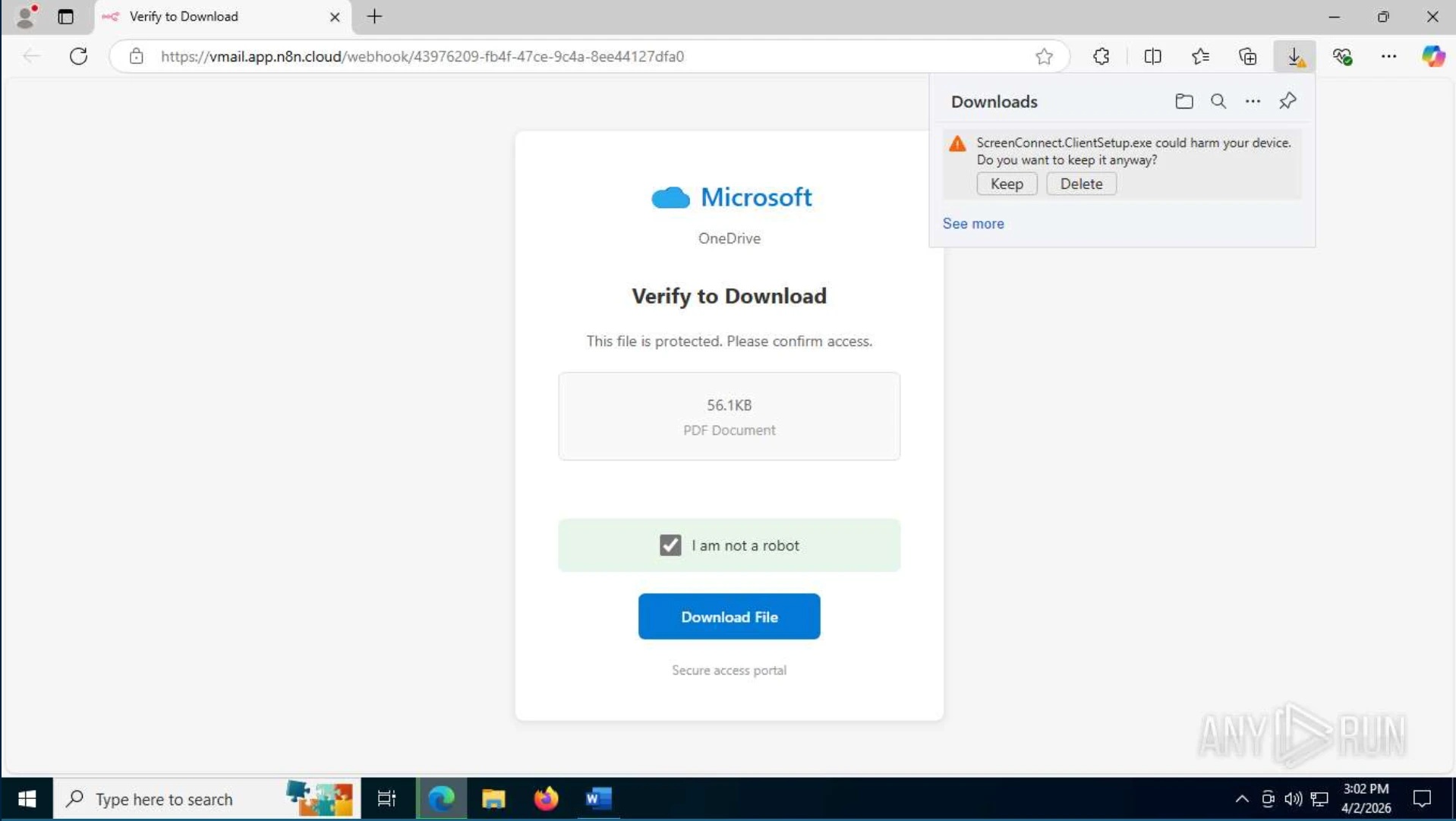
Fake Microsoft OneDrive page with an RMM installer disguised as a PDF document
This is why an interactive sandbox like ANY.RUN is important during early triage. It gives teams a safe environment to open suspicious URLs, follow the phishing flow, execute delivered files, and observe the behavior without putting the organization at risk.
This full visibility during early triage gives teams stronger evidence, faster validation, and more confidence in response decisions. Instead of treating the event as “just a legitimate tool,” SOC teams can prove whether the access path is suspicious and act before RMM abuse turns into business impact.
Turning RMM Uncertainty into Faster SOC Decisions
The main risk of phishing-to-RMM attacks is not only unauthorized access, but also the delay created when SOC teams cannot quickly prove whether a remote access tool is legitimate or attacker-driven.
Early attack-chain visibility helps remove that uncertainty. When triage teams can see the phishing URL, delivered file, execution behavior, RMM activity, and outbound connections in one place, they can make faster, evidence-backed decisions.
This gives the business:
- Faster validation of suspicious remote access activity
- Less time lost on gray-zone alerts
- Stronger control over approved RMM tool usage
- Faster containment before access spreads
- Clearer evidence for leadership and response reporting
- Higher SOC efficiency through more complete context from the start
With ANY.RUN’s Interactive Sandbox, SOC teams can safely analyze suspicious URLs and files, observe behavior in real time, and trace the full path from phishing page to remote connection. This helps teams reduce uncertainty, cut unnecessary escalations, and improve SOC efficiency by up to 3x.
Strengthen SOC response before trusted-tool abuse becomes business risk by giving your team full visibility into emerging attack chains during early triage.