
Make Doodle-Style Videos Using the AI Video Maker Sketch Mode
Doodle-style videos have become a booming trend due to the simplicity and high engagement. Their hand-drawn style is easy to notice and the content is easy to remember. The sketches in the cartoon automatically draw the audiences into any story whether it is informative, advertising or autobiographical. Doodle animation was once a complex operation that demanded advanced skills, specialized software and hours of work. The process is now made easier by AI-assisted tools that enable creators to create sophisticated, refined doodle animations with little knowledge of technical skills. The Sketch Mode of CapCut is the first of its kind as it offers ready-made sketch elements, transitions, and storyboard designs making it very easy to create an eye-catching doodle-like video on any topic.
What Sketch Mode Can do to Doodle-Style Creativity
The Sketch Mode of CapCut provides artificial hand-drawn lines and transitions created by AI, which look like real marker strokes. This aspect enables each scene to flow organic and still have a playful doodle feel. The platform contains numerous customizable features, including animated icons, arrows, squiggles and frames, which allow custom visual storytelling. Also, users have access to story-based sketch templates that are used to create explainer videos, educational or promotional narratives. These templates are both structured and creative, with customizable pacing, tone, and animation style, and minimal production time. Every sketch element is crafted by hand, so the videos do not need to be complicated to be viewed as appealing to audiences.
Creating Story Concepts through CapCut Brainstorming Tools
The creation of good story ideas is a must prior to animation. CapCut has embedded brainstorming systems which create innovative ideas, motifs, and possible storylines. You can put these ideas into storyboards, drawing out each scene visually and specifying how doodles transition to each other. The AI helps to choose the doodle styles that fit in the various tones, whimsical and comical to educational and narrative. These tools allow creators to visualize sequences prior to deciding to go to full production, minimizing revisions and producing coherent storytelling. Pacing and clarity are also preserved through the storyboard process that ensures the viewer is kept entertained throughout the video.
Improving Sketch Videos with AI Avatars, Music, and Effects
Incorporating AI video maker capabilities enhances doodle videos beyond hand-drawn sketches. Jovial artificial intelligence cartoon characters can be integrated and customized to fit the doodle theme, and they can appear in every scene. Background music may support mood, light, dramatic, or informative.
CapCut also includes sketch-style captions and animated speech bubbles which can blend with on-screen action. Such improvements make videos more engaging and realistic, and offer a professional level of output without the need to know video editing techniques. All audio-visual components are complementary to the hand-drawn style, which leads to a well-finished end product that can be used in various platforms.
Steps to Make Doodle-Style Videos Using the AI Video Maker Sketch Mode
Step 1: Start in the Creative Sketch Workspace
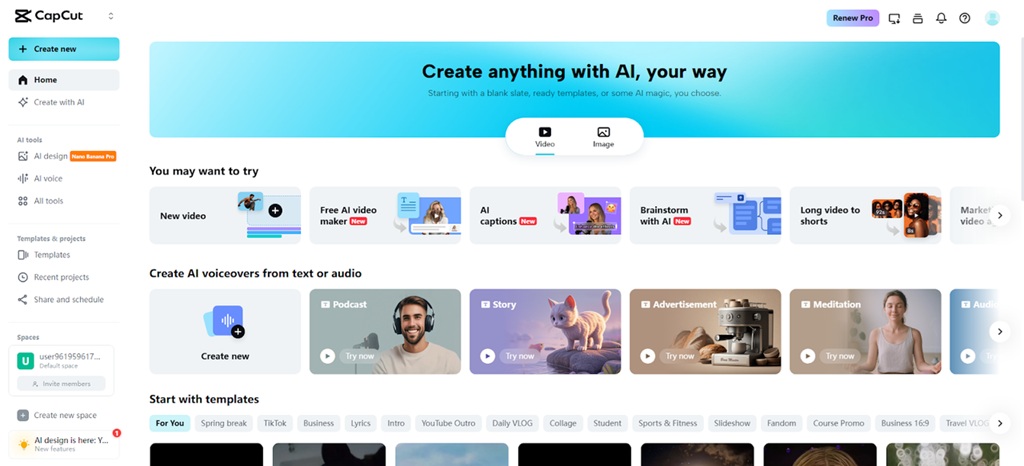
Open the CapCut online video editor and move into the main dashboard. Click on the "Free AI video maker" option to unlock the AI creation tools. Select "Instant AI video" to begin producing doodle-style videos using animated sketch concepts.
Step 2: Generate the Doodle Storyboard
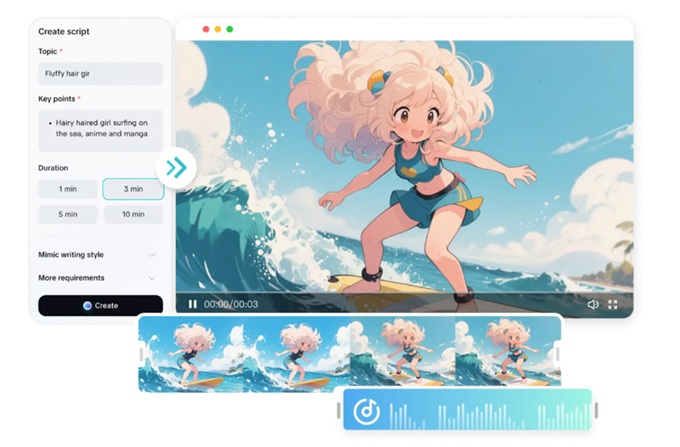
Pick a playful sketch-inspired visual style for the video. Enter the concept into the "Enter script" box, or activate "Generate script" to let the AI writer convert your idea into a structured storyboard outline. Select the preferred aspect ratio such as 16:9 for YouTube or 9:16 for short-form reels. Adjust the storyboard length and choose a narration tone that suits doodle animation. Click "Create" to generate a complete storyboard with structured scenes and visual cues.
Step 3: Add Motion, Captions, and Export
Click "Create" to reveal the full storyboard layout. Open the "Music" panel and add a fun background loop from CapCut’s suggested tracks. Navigate to "Elements" to apply a caption template that complements the doodle visuals.
After finalizing captions, click "Export" to select video resolution, format, and frame rate. Click "Export" again to download the completed doodle-style video.
Editing HandDrawn Elements in CapCut
The CapCut enables in-depth customization of doodle videos, with icons, arrows, squiggles, and animated doodles being overlaid onto the video in a creative way. The scenes may be piled up or interlaced to create a visually pleasing storytelling quality. One can also combine actual footage and doodle overlays to produce hybrid videos that are realistic but feature artistic elements. Customized illustrations, like custom-drawn frames or custom-crafted illustrations, may be added to conform to branding or story requirements. This is because this flexibility allows each video to have its own style making the contents stand out. This level of creativity is aided by an intuitive interface of CapCut, which maintains efficiency in production time. At this stage, tools like Nano Banana Pro can enhance video rendering and stylized sketch effects, providing additional customization for detailed projects.
Use of Doodle-Style Videos in the Industry
Doodle videos can be used in many purposes related to education, marketing, entertainment, and personal project. They simplify complex subjects in education, holding the interest of a student through visual narrative. They can be used by marketing departments to develop catchy product demonstrations, brand awareness adverts, and social media messages. Doodle-type stories with a mix of humor and illustration are helpful to entertainers and content creators to attract audiences. Hobby-based tutorials or family stories also lend a certain appeal to hand-drawn illustrations, which are personal projects. CapCut is used to provide high quality doodle video production in large volumes at a fast rate, allowing consistent production of high-quality doodle video content to meet a variety of professional and creative requirements. The effectiveness and versatility of the platform make it a necessity among creators who want to combine speed and beauty.
Conclusion
CapCut Sketch Mode allows creators to make videos that engage and appear professional even without the ability to draw by hand. The elements of AI-based automation, customization, and built-in storyboard capabilities turn ideas into powerful visual narratives in a short time. The icons that were originally drawn by hand are replaced with animation captions and background music that can be used to tell a story but the creative freedom is preserved. It is a flexible and user-friendly tool that enables users to try a variety of styles, polish material, and create a quality doodle animation that can be used across various platforms. Opportunity to use sketch-based animation can stimulate the use of imagination, and thus the doodles-type videos can be an effective form of communication, education, and entertainment.