
Data Security in the Age of Device Recycling and Refurbishment
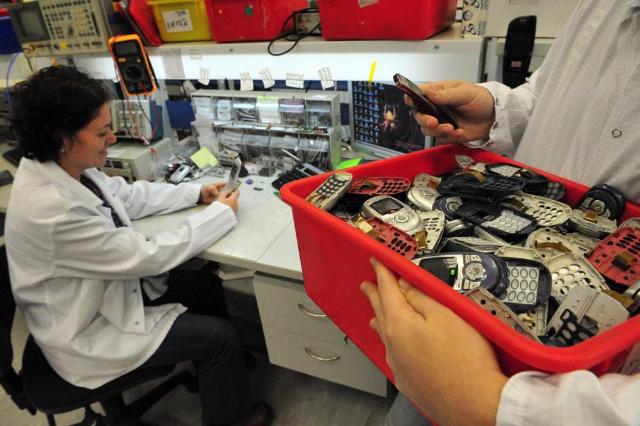
Image Source: depositphotos.com
When companies replace old laptops, servers, or smartphones, most think about the new gear and improved performance. What gets missed is the data that stays behind.
Customer lists, financial spreadsheets, emails—these can survive casual resets and end up in the hands of someone else. With sustainability initiatives pushing more devices into the refurbish-and-resell market, you need clear controls so greener IT doesn’t become your next breach.
The Lifecycle of a Device
A device’s life is simple to map. It starts fresh, gets configured for a user, carries daily work—documents, email, app logins—and then ages. After years of use, it’s retired.
If you don’t keep it, you can pull useful components for reuse, repair, and relist it, donate it to someone who can use it, or arrange for secure destruction. Each route is valid, provided you take the right precautions. Before you donate, wipe the device and remove any SD or SIM cards — a factory reset is usually a good start. For recycling, use a licensed e-waste centre and ask for a disposal receipt. Those simple steps protect your data and prevent improper waste handling.
Picture a sales laptop that stores proposals, tax documents, and locally cached VPN credentials. When that laptop goes to a refurbisher, the person who buys it shouldn’t be able to open a client file. Or think about servers taken down during data center decommissioning that hosted backups of product designs. If drives weren’t handled correctly, fragments of those designs can remain even after a quick format. Disposal is therefore a security step, not an afterthought.
Common Security Gaps in Device Recycling and Refurbishment
Real disposal practice often leaves predictable gaps.
Quick formats or factory resets are common but risky. They remove pointers to files, not always the data itself. Recovery tools can often reconstruct files unless the media was sanitized correctly. Hidden partitions, swap files, or synced cloud accounts can leave traces even after a reset.
Smaller devices and peripherals also get overlooked. Printers, copiers, conference-room systems, routers — many of these store scanned images, logs, and network credentials. External backups like USB drives and backup tapes collect in drawers and get thrown away. Treat them the same as a laptop: they can leak data.
Another common mistake is treating every storage device the same. Hard disk drives and solid-state drives behave differently. Using the wrong sanitization method increases the chance that data survives.
Best practices for secure disposal
To cut the risk of data leaks and improper disposal, use the right method for each item, record what you do, and get proof from the processor. Below are practical controls that form a reliable disposal program.
Certified Data Erasure
Use certified erasure tools that follow established media sanitization guidance. For magnetic HDDs, a verified overwrite (which confirms the drive has been sanitized) is effective. Overwriting rarely works on SSDs because wear-leveling hides copies of data. Instead, use the manufacturer’s secure-erase, a cryptographic erase, or a flash-aware eraser tool. And always keep the erasure report as proof.
Chain of Custody
Track devices from retirement to their final fate. Record who handled the device, timestamps, transport details, and where it went. A clear chain of custody prevents loss or substitution and supports audits and incident response.
Auditing and Verification
Don’t assume the process worked. Schedule audits of your disposal practices. Spot checks and independent audits often reveal the same things: a skipped secure wipe, the wrong erase utility, or a vendor who cut a corner on verification. Keep a short record for each issue (serial number, what failed, corrective steps taken, and who approved them).
Physical Destruction When Needed
For very high-risk assets, physical destruction is appropriate. But the method matters. Degaussing destroys magnetic media but won’t erase SSDs. Solid-state drives need shredding or disintegration into small particles to prevent recovery. Use destruction selectively and keep destruction certificates.
Use Accredited Partners
Work with vendors accredited in secure recycling and refurbishment. Look for recognized certifications and documented processes. Certified partners provide secure transport, traceable processes, and disposal records that reduce your compliance burden.
Retain Certificates and Reports
Collect tamper-evident certificates for erasure and destruction. Store them with your asset disposal records. These documents prove you followed policy and are vital if a regulator, customer, or auditor asks.
The Role of Regulations
Regulations make secure disposal mandatory in many sectors. Privacy laws require you to protect personal data until it is destroyed. Healthcare rules expect electronic protected health information to be removed before reuse. Financial regulators demand controls to prevent identity theft and fraud linked to disposed devices.
Think of compliance as the bare minimum. Regulators will also expect verifiable documentation as proof. Be ready to show an erasure certificate (with the device serial and the date), a signed chain-of-custody that logs each handover, and audit logs that record the specific steps taken. If you can’t produce records, regulators will probe — that can mean investigations, fines, or awkward public attention.
Balancing Sustainability with Security
Sustainability and security should go hand in hand. Refurbishing and donating devices reduces waste and saves money, but only when sanitization is airtight.
Set policies before donation or resale. Decide which assets can be refurbished and which must be destroyed. Donating laptops to schools is a great idea, but only after media-appropriate erasure and verification. For bulk resale, require refurbishers to provide erasure certificates and quick incident return paths.
Choose partners that handle both environmental and privacy responsibilities. Certified recyclers use environmentally sound methods while ensuring data sanitization. That way, you meet ESG goals without opening privacy holes.
Conclusion
Recycling and refurbishment are smart for the planet and your budget. But device end-of-life is a security boundary you can’t ignore. From laptops used by sales to drives removed during data center decommissioning, data can survive unless you apply the right method for each media type, verify outcomes, and keep records.
Make secure disposal a formal part of asset management. Match the sanitization method to the device. Use vetted processors, log who handled each asset and when, and keep the disposal or erasure paperwork. Doing this reduces the risk of data exposure, shows regulators you’ve done your part, and supports responsible recycling.