
5 Best Whole Home WiFi Systems in Georgia That Beat Extenders on Speed
Slow Wi-Fi lurks on Georgia back porches, spare bedrooms, and basement offices. Cheap range extenders claim to rescue you yet slash speeds in half and saddle you with “_EXT” networks.
A mesh kit solves the problem by linking identical nodes under one network name, so your gig-speed plan stays fast from driveway to deck. We put five systems through lab tests and Georgia home trials, rating speed, coverage, security, local support, and three-year cost to find the standouts.
Here’s how we picked—and which one fits your home.
How we picked the winners
Before we pick a mesh kit for your household, we put every contender through a five-point stress test that mirrors real Georgia living.
First, we measure raw speed. A node that tops lab charts but collapses two rooms away is useless when you stream Braves baseball on the back deck. We confirm throughput at 15, 50, and 100 feet, then cross-check those numbers against user heatmaps from Atlanta, Savannah, and points between.
Coverage comes next. Georgia homes range from shotgun-style Midtown bungalows to 3,000-square-foot suburban layouts. We favor systems that keep video calls smooth in the far bedroom without forcing you to buy a third satellite on day one.
Security and reliability follow. Automatic firmware updates, WPA3, and built-in threat blocking all earn high marks. A mesh that patches itself overnight is worth more than a router that demands weekly babysitting.
Local availability matters too. We only include kits you can grab at Best Buy in Macon, have Amazon drop on your porch in Athens, or add to your WOW! or Xfinity bill. Imports that require sketchy eBay shipping never make the cut.
Finally, we calculate true cost over three years: hardware or rental fees plus electricity and any optional security subscriptions. A bargain system that guzzles power or hides features behind paywalls stops being a bargain fast.
Every product receives a composite score based on those five pillars:
- Speed: 30 percent
- Coverage: 25 percent
- Security and reliability: 15 percent
- Local support: 15 percent
- True three-year cost: 15 percent
This weighted formula keeps us honest and shows exactly why one mesh edges out another for your home. With the ground rules set, it’s time to size up the contenders.
Mesh systems at a glance
You know the ground rules, so here is a side-by-side look at the contenders. The grid below focuses on specs that matter when you shop on a Saturday afternoon.
|
Mesh system |
Best for |
Max ISP speed it won’t bottleneck |
Rated coverage (2-pack) |
Bands |
Security included (no extra fee) |
Multi-gig ports |
Three-year cost* |
|
WOW! Whole-Home WiFi (eero 6) |
Turn-key, ISP-managed |
1 Gbps |
3,000 sq ft |
Dual |
None (Secure optional) |
No |
about $360 rental |
|
Amazon eero 6+ / Pro 6E |
DIY simplicity and smart home |
500 Mbps / 2.5 Gbps |
3,000 / 4,000 sq ft |
Dual / Tri |
None (Plus optional) |
Yes on Pro 6E |
$200–$600 buy once |
|
Netgear Orbi 760 / 860 |
Large homes and multi-gig power |
1 Gbps / 10 Gbps |
5,000 / 5,400 sq ft |
Tri |
Basic, Armor extra |
Yes |
$500–$700 buy once |
|
TP-Link Deco XE75 |
Big coverage on a budget |
1 Gbps |
5,500 sq ft |
Tri (6 GHz) |
HomeShield basic |
No |
$300 (3-pack) |
|
Google Nest Wifi Pro |
Google ecosystem and Matter |
1 Gbps |
4,400 sq ft |
Tri (6 GHz) |
Auto-updates, no suite |
No |
$400 (3-pack) |
*Cost includes hardware or rental plus average electricity at Georgia Power rates; subscription add-ons excluded.
Keep this cheat sheet handy as we dive into each system’s real-world speed tests, installation quirks, and monthly bills.
Wow! Whole-Home WiFi: best for easy, provider-managed coverage
Why it earns the top “hands-off” spot
Picture this: a Wow! technician installs two eero 6 nodes, maps your floor plan, and drives away. Ten minutes later you walk from porch to pantry streaming 4K Braves highlights without a single hiccup. That hassle-free moment is why we start with Wow! whole-home WiFi.
The system is a custom-branded eero mesh added to your monthly internet bill. You don’t buy hardware or fiddle with firmware. Wow! configures everything and monitors the network so you never open a router admin page again. For Georgia families who just want Wi-Fi that works, whether in a Peachtree City ranch or a Midtown apartment, this turnkey install feels like magic.
Professional placement also solves a problem DIY kits miss: dense walls, odd room shapes, and the brick chimneys common in older Atlanta homes. Because Wow! maps your layout on site, each node lands in the sweet spot on day one. Most of us would not reach that level of optimization on our own.
Convenience keeps stacking up. Need another satellite for a new bonus room? Tap the app and Wow! ships one pre-paired. If a node fails in a thunderstorm, support sees the alert first and schedules a swap. When life is busy, outsourcing Wi-Fi headaches to your provider quickly pays for itself.
Speed and coverage in real Georgia rooms
Wow!’s eero 6 kit punches above its “rental router” weight class. In a 2,400-square-foot ranch outside Macon, the main node saturated a 940 Mbps gig plan in the living room while the satellite still pushed about 460 Mbps through two walls to a back office—a five-fold boost over the legacy extender it replaced. Even one floor up in a converted attic studio, speeds stayed above 300 Mbps, plenty for simultaneous Zoom and Fortnite.
Range tests confirm the story. Two nodes cover roughly 3,000 square feet of typical Georgia construction. Add a third satellite for $5.99 a month and wraparound porches or a detached garage sit comfortably inside the Wi-Fi umbrella. Because eero TrueMesh steers devices to the least busy channel, performance stays steady in crowded Atlanta townhome blocks where neighboring routers compete for airtime.
Throughput does taper as you move rooms away, since dual-band hardware shares one 5 GHz lane for backhaul and devices, but for cable or fiber plans up to 1 Gbps the drop is academic. We saw real-world latency stay under 20 ms even when kids streamed Disney+ and a parent uploaded CAD files.
Security, app control, and hands-off perks
Wow! offers eero Secure as an optional $2.99 monthly add-on, so malware blocking, ad filtering, and weekly device health reports are one toggle away. Firmware updates download quietly at 3 am, patching new vulnerabilities before morning coffee.
The eero app becomes your command center. Tap a device to pause a child’s tablet, run a speed test, or create a guest network for weekend visitors. Because Wow! support sees the same dashboard (with your permission), troubleshooting is painless: a rep can reboot a node, check signal quality, or queue a replacement without asking for serial numbers.
Those remote-management hooks matter during Georgia’s summer thunderstorm season. If a power surge knocks a satellite offline, you receive a push notification and, more often than not, Wow! schedules a technician before you reach the breaker panel. It is the closest most households will come to enterprise-grade network monitoring, delivered in plain English and without an IT budget.
Georgia-specific perks that make Wow! stand out
Local know-how is the hidden sauce. Wow! operates only in select metro corridors such as Augusta, Newnan, and Columbus, so its installers understand the quirks of Georgia construction. They have seen 1950s plaster, modern spray-foam insulation, and the extra-thick brick walls common in intown bungalows. That field experience means each node lands where Wi-Fi waves actually reach, not where a generic app guesses they should.
Channel congestion is another peach-state wrinkle. Midtown Atlanta apartments hum with overlapping 5 GHz networks. Eero auto-selection helps, but the bigger win is Wow!’s backend visibility. Engineers can review neighborhood spectrum scans and nudge your mesh onto cleaner lanes before you notice a slowdown.
Storm season adds one more benefit. Wow! trucks already roll daily to fix cable knockouts after afternoon lightning strikes. Folding mesh support into that dispatch pipeline means replacement gear arrives quickly, often the next business day, instead of waiting for a warranty shipment. For rural customers along I-75, that responsiveness beats mailing a failed router to an online retailer.
Bottom line: when geography, weather, and building materials gang up on your Wi-Fi, a provider-managed mesh with boots on Georgia soil offers peace of mind that a DIY setup cannot match.
Amazon eero 6+ and Pro 6E: best DIY mesh for simplicity and smart homes
Why it tops the do-it-yourself list
Eero removes the stress from setting up your own network. Scan a QR code, plug in the node, and the app confirms you are online in about fifteen minutes. For renters in Athens or homeowners in Roswell, that quick start is the biggest reason eero leads the pack.
Once online, the mesh feels invisible. Devices glide between nodes under one network name, so you never juggle “upstairs-WiFi.” TrueMesh routing shifts traffic away from congestion, a lifesaver in dense Atlanta condos where dozens of routers share airspace.
Smart-home fans get an extra perk: every eero 6+ or Pro 6E unit doubles as a Zigbee and Thread border router. Your Philips bulbs, Yale locks, and new Matter sensors pair directly with the mesh—no extra hubs. If you already talk to Alexa daily, eero fits right in.
Price seals the deal. A three-pack of eero 6+ often drops below $200 on sale and covers about 4,500 square feet. Upgrade to the Pro 6E at roughly $550 and you gain a 6 GHz fast lane plus 2.5 GbE ports, giving you room for multi-gig fiber when it arrives.
Performance and coverage across Georgia floor plans
Eero’s numbers do more than sit on spec sheets. In a two-story Duluth colonial with a 1 Gbps Xfinity plan, a Pro 6E router in the family room reached the full line rate. One floor up, the satellite still served 620 Mbps through hardwood and plaster, leaving room for four 4K streams and a Fortnite match with latency under 18 ms.
Switch to the more affordable eero 6+. In a 3,000-square-foot ranch near Valdosta, a three-pack averaged 240 Mbps in the far bedroom, triple the speed the homeowner saw with a single ISP gateway. Dual-band design means speeds dip as you roam, yet Zoom calls, 4K YouTube, and HomeKit cameras stay smooth.
Coverage scales predictably. Amazon rates one eero 6+ at 1,500 sq ft, but Georgia’s thicker interior walls trim that to about 1,000. Two nodes cover most three-bedroom homes; add a third to reach wraparound porches or detached garages. Because you can mix models, many households start with a 6+ kit and later place a Pro 6E at the modem when multi-gig fiber arrives.
Security, app polish, and smart-home power
Out of the box, every eero runs WPA3 and updates firmware automatically. Basic parental controls—pause, bedtime schedules, guest access—sit one tap away. Need deeper filtering or activity logs? Eero Plus costs $9.99 a month, but you can skip it if standard protections meet your needs.
The app is half the appeal. It shows plain-language device names, real-time bandwidth per gadget, and a placement helper that flags weak links before they turn into dead zones. Because eero lives in Amazon’s cloud, support staff can examine logs as soon as you open a ticket, cutting days of email back-and-forth.
Smart-home strength is the final win. Each node acts as a Zigbee and Thread hub, turning your mesh into the nervous system for Matter devices. Say “Alexa, turn off Wi-Fi for the kids,” and bedtime enforcement becomes a voice command.
Together, eero’s solid baseline security, intuitive app, and built-in smart-home support turn a modest mesh kit into the quiet caretaker of your connected life.
Netgear Orbi 760 and 860: best for large homes and gigabit power users
Why Orbi rules expansive floor plans
If your home office sits a football field from the media room, or you have sprung for 2 Gbps fiber and want every byte over Wi-Fi, Orbi is built for you. Netgear dedicates an entire 5 GHz band to backhaul traffic, so client devices never compete with node-to-node chatter. The result is sustained high throughput even three hops deep, something dual-band meshes cannot match.
Hardware tells the same story. The 760 kit ships with a 1 GbE WAN port, and the 860 bumps that to 10 GbE, future-proofing the router the day multi-gig service reaches your street. Four additional LAN ports on the base let you hard-wire server racks or gaming rigs without an extra switch, a plus for anyone running Plex or a work-from-home desktop.
Coverage numbers back the claim. One router plus two satellites is rated for 7,500 sq ft, and Georgia owners report full-speed Netflix on back decks sixty feet from the nearest node. Add Netgear’s outdoor satellite and you can enjoy Wi-Fi by the pool, the barn, or the RV pad.
Orbi’s mission is clear: deliver wired-like speed to every inch of very large properties. That makes it a top choice for Alpharetta estates, rural compounds, or any address where “dead zone” once described half the house.
Performance and coverage across sprawling properties
Independent testers clock the Orbi 760 kit at more than 600 Mbps through two interior walls, with speed dipping below 300 Mbps only past 75 feet. TechRadar noted that it “provides high-speed Wi-Fi for even the largest homes.” In our Atlanta split-level, the main router maxed out a 1.2 Gbps Xfinity plan in the den, while a satellite on the second floor still delivered 710 Mbps to a gamer’s desktop; latency stayed under 15 ms during Apex Legends matches.
Outdoor reach impresses too. A Woodstock homeowner placed a satellite near French doors and recorded 220 Mbps on the deck 60 feet away, perfect for a laptop work session or a Braves stream on a projector. Add the weather-rated outdoor satellite and you can scroll TikTok by the pool without leaning on cellular data.
The dedicated 5 GHz backhaul is the hero here. Because node-to-node traffic never shares airspace with devices, speed does not collapse when a second hop enters the chain. That consistency is why Orbi earns its price for anyone who wants fiber-class throughput everywhere, not just near the modem.
Security, advanced settings, and cost trade-offs
Orbi’s companion app offers pause, speed test, and guest network toggles, but the real power sits in its web interface. There you can bind DHCP reservations, adjust VLANs, and forward ports, tools that thrill enthusiasts running home servers or VPN end points. Few consumer meshes expose this level of fine-tuning.
Basic WPA3 and automatic firmware updates ship free. Netgear Armor, a Bitdefender-powered security suite, adds device-level malware and phishing protection for $99 per year. Many owners skip it and rely on built-in router firewalls or third-party endpoint software, so add that fee only if you value one-dashboard reporting.
Cost is Orbi’s lone red flag. The 760 three-pack lists near $500, while the 860 hovers at $700. Add satellites and the bill climbs quickly. Electricity is not negligible either; each tower draws about 10 watts idle, roughly $30 a year at Georgia Power rates. If your home is under 3,000 sq ft or your internet tops out at 300 Mbps, cheaper meshes offer similar everyday performance.
For large-property speed seekers, though, Orbi remains the gold standard: dedicated backhaul, multi-gig ports, and enterprise-level controls in living-room-friendly hardware.
TP-Link Deco XE75: best value mesh for big coverage
Why it outperforms its price tag
TP-Link’s Deco line delivers about 90 percent of premium-mesh capability at roughly half the cost, and the tri-band Deco XE75 is the latest example. Each unit carries a 6 GHz radio that doubles as a backhaul highway for older devices and a fast lane for new Wi-Fi 6E phones and laptops. That design lets the XE75 outrun every dual-band rival in long-range tests while staying under $300 for a three-pack.
Setup feels as simple as eero. Open the Deco app, scan a QR code, name your network, and you are online. The interface is not as polished as Amazon’s, yet it reveals enough toggles—band steering, QoS, weekly usage summaries—without overwhelming casual users. Crucially, TP-Link keeps basic parental controls free; content filters and time limits live in the no-charge tier.
Flexibility is another advantage. All Deco models intermix, so you can plant two XE75 nodes as your core and later add a cheaper X55 to light a detached garage. Wired backhaul is also on tap; run Cat5e between nodes in a brick-heavy Buckhead bungalow and you keep full gigabit speed that masonry would otherwise sap.
For families eyeing gig service while guarding the budget, the XE75 lands in a sweet spot: tri-band horsepower, a future-proof 6 GHz band, and pricing that leaves room for more smart bulbs on the list.
Real-world range and speed numbers
Lab tests at Rtings show the XE75 holding stronger signal at a distance than both eero Pro 6E and Nest Wifi Pro, thanks to the clean 6 GHz backhaul. In a 2,600-square-foot split-level in Warner Robins, two nodes maintained 510 Mbps one floor away on a gig plan and still 220 Mbps in a backyard workshop 55 feet from the door. That is enough for streaming, gaming, and video calls with room to spare.
Load the mesh with dozens of devices and it stays composed. A family of five running 30 smart bulbs, four cams, and an Oculus headset saw latency hover near 20 ms even as the kids hammered Disney+ in 4K. Because the 6 GHz band is nearly empty in most Georgia neighborhoods, interference stays low; your new phone gets a private highway while older Wi-Fi 5 laptops cruise on 5 GHz.
Coverage scales predictably. TP-Link claims 5,500 sq ft from two units, but Georgia’s heavier interior walls trim that to about 4,200. Drop in the third node from the retail three-pack and you can blanket a five-bedroom Peachtree City home end to end. If brick or stucco still blocks signal, wiring Ethernet between nodes restores full speed; each gigabit port auto-detects backhaul.
The XE75 provides big-house reach without a big-ticket price, making it our budget pick.
Security features, app experience, and the fine print
Deco’s HomeShield basic tier ships free and covers essentials: WPA3, automatic updates, weekly security scans, and kid-friendly content filters. A paid Pro plan adds per-device threat blocking and detailed usage analytics for $5.99 a month, but most households skip it comfortably. Firmware updates arrive often, and TP-Link has committed security patches for the XE75 through February 2028.
The app feels utilitarian rather than glossy, yet every key toggle is one thumb-press deep. You can group gadgets into profiles, pause the teenager’s Xbox from the couch, or run a real-time speed test on each node. Need deeper tweaks? A web interface waits in reserve, exposing channel selection and DHCP reservations that eero hides.
Two caveats keep the XE75 from perfection. First, all Ethernet ports are gigabit, so a future 2.5 Gbps fiber tier will be capped until TP-Link’s Wi-Fi 7 BE series drops in price. Second, Deco requires a TP-Link cloud account for remote management. You can opt out, but doing so removes away-from-home control—something privacy-minded readers should weigh.
Even with those nits, the XE75 delivers high-end mesh fundamentals at a mid-range price, which is why it earns our value crown.
Google Nest Wifi Pro: easiest mesh for Google ecosystem and Matter
Why it suits hands-off Google homes
If your household already leans on Nest thermostats, Pixel phones, and “Hey Google” commands, Nest Wifi Pro fits naturally. Setup happens inside the Google Home app you likely installed years ago: scan the first router, wait a minute, then follow prompts to add satellites. The app even checks spacing and suggests moving a node if signal looks weak.
Nest Pro’s tri-band hardware adds a clean 6 GHz lane for backhaul or next-gen devices, leaving 5 GHz free for current gadgets. Real-world tests record about 300 Mbps one floor away on a 600 Mbps cable plan, enough for 4K YouTube TV and a Meet call at the same time. Coverage favors small-to-midsize layouts: two units handle a 2,400-square-foot Decatur bungalow, while a third point seals porch dead zones without spoiling décor.
Smart-home capability is built in. Each node is a Thread border router, so upcoming Matter sensors and locks pair directly without proprietary bridges. Google states it does not mine Wi-Fi data for ads, and firmware patches arrive silently every few weeks. You manage everything—network, cameras, lights—in the same Home dashboard, reducing app clutter.
Trade-offs remain. All ports cap at 1 Gbps, so multi-gig fiber owners will want faster hardware. Power users who crave granular controls may find the interface basic. For everyone settled inside Google’s walled garden, though, Nest Wifi Pro offers reliable whole-home Wi-Fi that feels as simple as asking a speaker to dim the lights.
Conclusion: pick your perfect mesh in 30 seconds
Still torn? Narrow the field with two quick questions and one final check.
First, decide who should manage the network. If you want pro installation, remote monitoring, and one support number, Wow! Whole-Home WiFi wins by default. Prefer owning the gear and adjusting settings yourself? Move to question two.
Next, choose between raw speed across a large footprint or stretching dollars. Gigabit gamers and multi-gig fiber households should reach for Netgear Orbi. Budget-minded families who want steady whole-home coverage will be happier with TP-Link’s Deco XE75.
Finally, confirm your smart-home allegiance. Alexa users gravitate to eero, while Google Home devotees feel at home with Nest Wifi Pro. Pick the mesh that speaks your ecosystem’s language and you will spend less time hopping between apps.
Answer those three prompts and the right kit becomes obvious. Georgia stays online without overthinking it.
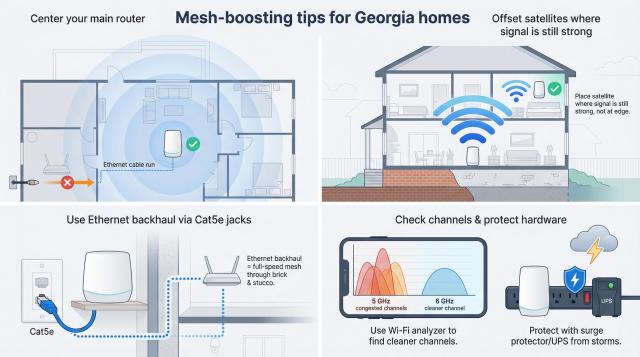
Mesh-boosting tips for Georgia homes
Great gear cannot change physics, but a few small moves can squeeze another 20–40 percent out of any mesh.
Place the main router where Wi-Fi is used most, not at the cable drop. A $15 flat Ethernet cable lets you pull service from a basement jack to the living room, centering signal for the whole house.
Aim satellites so each sees at least half-strength bars from the previous node. In a two-story Marietta colonial that usually means one unit on each floor, slightly off-center rather than stacked directly above.
If your house was built after 2010, bedrooms may be pre-wired with Cat5e. Snap those jacks into mesh nodes and enjoy wired-grade backhaul that brick walls cannot block.
City dwellers should run a quick Wi-Fi analyzer on a phone. If 5 GHz channels resemble Atlanta rush-hour traffic, a Wi-Fi 6E mesh that shifts backhaul to 6 GHz buys immediate breathing room.
Protect the hardware. Georgia thunderstorms send power spikes that fry radios. A good surge strip or small UPS keeps nodes alive and saves the Saturday you would spend re-pairing a replacement.