
Ajax Security Systems: A Field Guide to Modern Intrusion Protection
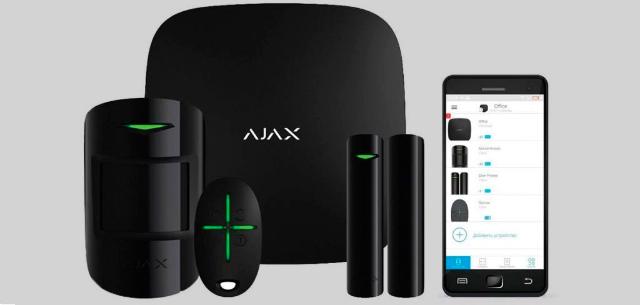
Wireless intruder alarms are gaining traction because of their rapid deployment, lower total cost of ownership and remote management capabilities. In Melbourne, where properties range from heritage homes to mixed-use retail developments, Ajax security systems provide a flexible, reliable solution. If you're evaluating Ajax security for a residential or commercial site, this Melbourne field guide covers design, hardware, deployment, and monitoring best practices. Drawing on real-world installations, this guide breaks down what makes Ajax systems effective, common pitfalls to avoid, and how to ensure robust protection without overcomplicating your setup. Whether you are retrofitting an older site or securing a new build, these lessons apply globally.
What makes Ajax different and where it fits in
System Architecture Overview
Ajax security systems rely on a central hub that communicates with encrypted RF peripherals using Jeweller protocol, a proprietary wireless technology. The hub connects to the Ajax cloud for real-time application control and notifications. Devices include motion detectors, door/window sensors, and cameras, all managed from a single mobile app. Optional Ethernet, Wi-Fi or cellular connectivity provides flexibility for different site requirements. This architecture is suitable for homes, small businesses, and temporary locations such as construction sites where wiring is impractical.
Strengths: Fast Retrofit, Reliable RF Range, Anti-Tamper/Anti-Jamming, App-First Experience
Ajax excels at retrofits without the need for invasive cabling. Its RF range (up to 2,000 meters in open space) supports large properties, with range extenders for complex layouts. Anti-tamper and anti-jam features such as frequency hopping and device authentication enhance security. App-first design provides intuitive arming, disarming and event monitoring, with push notifications for critical alerts. Long battery life, often up to 7 years, minimizes maintenance.
Typical Limitations / Considerations
Proper equipment placement is critical to avoid RF interference from thick walls or metal structures. RF planning ensures stable communications, especially in multi-story buildings. Professional commissioning is recommended to optimize performance, as model-dependent communication paths (e.g., Wi-Fi vs. cellular) affect reliability. Improper setup can result in false alarms or missed events.
Core hardware stack you'll actually use
Hubs and Communicators
The Ajax Hub (e.g., Hub 2 Plus) is the heart of the system, supporting Ethernet, Wi-Fi, and dual-SIM cellular for redundancy. Higher-end models offer multiple communication paths to ensure uptime during Internet or power outages. Choose based on site size and connectivity needs-basic hubs for small homes, advanced models for larger SMBs.
Detectors
Ajax provides a number of detectors:
-
Motion Detectors: Pet-immune options (ignoring pets under 20 kg) reduce false alarms. Outdoor PIRs such as MotionProtect Outdoor detect perimeter threats.
-
Door/Window Sensors: Compact reed switches monitor entry points.
-
Glass breakage detectors: DualTone algorithms distinguish shattering glass from other sounds.
-
Shock/vibration sensors: Detect tampering or forced entry attempts.
Perimeter and Deterrence
Outdoor sirens (up to 113 dB) and indoor sirens deter intruders. Panic buttons, such as the Ajax button, trigger instant alerts to users or monitoring stations. Smart relays control lights, gates or locks and integrate with automation scenarios for added deterrence.
Keypads, Tags/Cards; User Roles and Access Hygiene
Keypads (e.g. KeyPad Plus) support passcodes or RFID tags/cards for arming/disarming. The Ajax application allows for granular user roles, ensuring that only authorized users control specific functions. Regular audits of user access prevent unauthorized changes.
Video Integration
Ajax integrates with RTSP-compatible CCTV systems or its own cameras (e.g. IndoorCam). Installers often pair motion sensors with cameras for visual verification, streamlining event response without proprietary lock-in.
Design Principles for Reliable Wireless Alarms
Site Survey and RF Mapping
A thorough site survey identifies RF challenges such as concrete walls, metal roofs or nearby Wi-Fi interference. Use Ajax's range calculator to map signal strength and plan range extender placement. Consider hop counts in large or multi-level sites to maintain connectivity.
Layered Security
Design with concentric protection: perimeter sensors (outdoor PIRs, door/window contacts), indoor motion detectors, and safe room logic (panic buttons, keypads). This provides multiple barriers to intrusion and reduces reliance on a single point of detection.
Environmental factors
Consider site-specific challenges:
-
Garages/Sheds: Need weatherproof sensors (IP55 or higher).
-
Construction Sites: Require portable, battery-powered setups.
-
Strata/Common Areas: Require clear separation of user roles to avoid conflicts.
Fail-safe thinking
Plan for redundancy: backup batteries (up to 16 hours), dual communications paths (cellular + Wi-Fi), and local sirens to alert in the event of a loss of connectivity. Test failover scenarios during deployment.
Deployment Playbook Step-by-Step
Pre-Install: Risk Profile, User Stories
Assess the risk profile of the site (e.g. high crime area, remote location). Define user stories: a home requires simple arming, while a retail site requires employee access control and after-hours monitoring. Tailor device selection to meet these needs.
Device placement patterns
-
Place motion detectors at least 5 feet (1.5 m) high and away from direct sunlight or heat sources.
-
Install door/window sensors at all accessible entry points.
-
Position outdoor PIRs to cover blind spots and adjust sensitivity to avoid nuisance triggers from pets or foliage.
Commissioning and testing
Perform walk tests to verify detector coverage. Test tamper switches and alarm paths (app notifications, sirens, monitoring station). Simulate power and Internet outages to confirm redundancy.
Handover
Train users on application navigation, arming/disarming, and incident response. Assign app roles (admin vs. user) and conduct drills for duress or intrusion scenarios.
Monitoring and response that really works
Self-Monitoring vs. Professional ARC
Self-monitoring via the Ajax application is suitable for cost-conscious users and provides real-time alerts. Professional Alarm Receiving Centers (ARCs) provide 24/7 response, ideal for businesses or high-risk locations. Choose based on your response speed needs and budget.
Event Types Worth Escalating
Prioritize:
-
Duress: Panic button activations.
-
Confirmed intrusion: Multiple triggered sensors (e.g. door + motion).
-
Power/cell loss: Potential sabotage attempts.
Playbooks
Define escalation: App alerts notify users first, followed by ARC contact. Enable photo verification for motion events to support police reports. Document evidence collection and incident log procedures.
Security and Privacy Posture
RF Security
Ajax uses 128-bit AES encryption and frequency hopping to prevent jamming. Device authentication ensures that only trusted peripherals connect. Regular firmware updates maintain security.
Account security
Enable MFA for application access. Assign least privilege roles (e.g., employees can arm/disarm but not edit settings). Audit logs track user actions for accountability.
Data minimization and privacy
Ajax stores minimal user data, with video feeds accessible only to authorized users. Customizable privacy settings allow users to control camera access, ensuring compliance with local regulations.
Transparent cost and ROI framework
Hardware Bundle Levels
-
Starter Home: Hub, 2-3 detectors, keypad (~$500-$800 AUD).
-
Typical SME: Hub 2 Plus, 5-10 detectors, cameras, sirens (~$1,200-$2,000 AUD).
-
Perimeter-heavy sites: Outdoor PIRs, range extenders, smart relays (~$2,500+ AUD).
Cost drivers
One-time installation costs vary depending on number of zones and complexity ($300-$1,000 AUD). Professional monitoring ranges from $20-$50/month, depending on response level. Outdoor PIRs and cameras increase upfront costs, but increase deterrence.
TCO over 3-5 years
Factor in battery replacement (every 5-7 years), occasional service visits ($100-$200/visit), and free firmware updates. Ajax's long battery life and minimal maintenance keep the TCO competitive with wired systems.
Melbourne Case Notes Transferable Lessons
Brick vs. lightweight construction
Melbourne's brick buildings attenuate RF signals, requiring range extenders for multi-story layouts. Lightweight retail construction (wood/gypsum) allows for longer sensor ranges, but requires careful interference planning.
Mixed retail/residential
Storefronts with rear apartments (common in Melbourne) benefit from zoned systems: separate arming for retail and residential areas. Use keypads for staff and app control for residents.
Construction/Temporary Sites
Ajax's relocatable kits suit Melbourne's construction boom. Battery-powered hubs and sensors deploy quickly, and sirens deter opportunistic theft.
Common mistakes to avoid
-
Treating wireless like wired: Skipping RF surveys results in signal loss.
-
Single communications path: Relying on Wi-Fi alone risks outages; add cellular.
-
Set up and forget: No drilling or maintenance to cause user error.
-
Misplaced outdoor sensors: Placing PIRs near foliage or roads triggers false alarms.
Frequently Asked Questions
Is wireless reliable enough for small warehouses?
Yes, with proper RF planning. Ajax's range extenders provide coverage in large spaces, and tamper detection adds reliability.
How far can sensors reach in practice, not on the spec sheet?
In real-world conditions, expect 500-1,000 meters with clear line-of-sight, less in brick or multi-story buildings.
Can I integrate with my existing CCTV/NVR?
Yes, Ajax supports RTSP compatible cameras and NVRs for seamless integration.
What about pets and outdoor areas?
Pet-immune motion detectors ignore animals under 20 kg. Outdoor PIRs require careful placement to avoid false alarms from pets or wildlife.
What happens when the Internet goes down?
Hubs with cellular backup maintain alerts. Local sirens are still activated, and battery-powered devices function offline.
Do I need professional monitoring?
It depends on the risk. Self-monitoring is appropriate for low-risk homes; professional ARCs are better for businesses or high-crime areas.