

|
By Saloni Walimbe
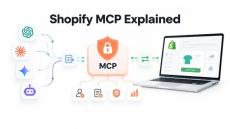
Imagine asking an AI assistant to find a product, put together a shopping cart, or help you update your Shopify store. For the assistant to complete these tasks, it needs a way to interact with Shopify. Shopify MCP provides that connection.
|
By miniOrange
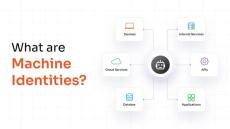
A machine identity is the set of credentials a non-human entity, such as an application, device, workload, or service, uses to authenticate itself and communicate securely with other systems. Just as an employee proves who they are with a username and password, a machine proves who it is with cryptographic credentials like a digital certificate, an API key, or a service account token.
|
By Stutee Raja
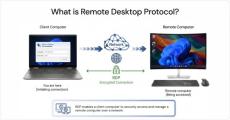
A field employee's laptop crashes, or a server in another office needs a patch, or a remote worker gets locked out of their workstation. For all these situations, the IT team needs to get in, fix it, and move on, without being there. Remote Desktop Protocol (RDP) is Microsoft's answer to that problem. It's a network protocol that lets you connect to another computer over a network and control it as if you were sitting right in front of it.
|
By Stutee Raja
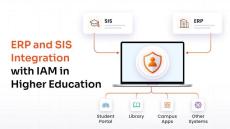
Higher education institutions manage identity information across systems such as Enterprise Resource Planning (ERP) platforms, Student Information Systems (SIS), and HR systems. These records determine whether someone is a student, employee, faculty member, researcher, alumnus, or another type of campus user. Integrating these systems with Identity and Access Management (IAM) lets institutions use those records to manage digital identities and access throughout the user lifecycle.
|
By miniOrange
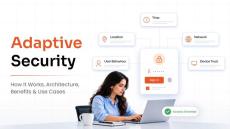
Adaptive security is a cybersecurity approach that continuously monitors users, devices, networks, and security events to identify risks and adjust defenses in real time. Unlike static security models that rely on fixed rules and periodic updates, adaptive security responds to changes in behavior, context, and threat levels as they occur. It continuously evaluates security risks, detects unusual or suspicious activity, and adapts security controls based on the situation.
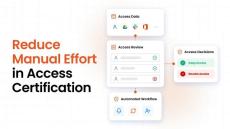
Access certification can take more time than the actual review. A manager may need to review access for 50 employees. Before that happens, someone has to gather the access data, identify the right reviewer, send the requests, and track the responses. If the reviewer revokes access, someone may also need to remove it from the application. Now repeat that across hundreds of users and several applications. The workload adds up quickly.
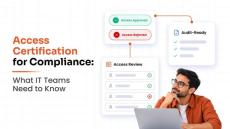
An access review can look complete on paper. The campaign closed, reviewers made their decisions, and the records were saved. Then an auditor asks: Who reviewed this access, what did they decide, and what happened afterward? That question can reveal problems that a completed review does not show. A rejected permission may still be active. An exception may have no clear reason. The team may also struggle to show when the review happened.
|
By Chaitali Avadhani
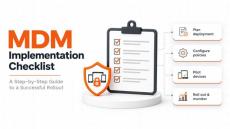
Enrolling devices is only one part of implementing Mobile Device Management (MDM). Before rollout, IT teams need to define ownership models, prepare the environment, configure policies, and verify that employees can access the apps and resources they need. This MDM implementation checklist breaks the process into seven phases, from initial planning to ongoing device management. Use it to organize responsibilities, identify dependencies, and confirm that each phase is ready before moving to the next.
|
By Minal Purwar
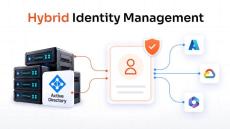
Hybrid identity management is the practice of managing user identities and access across on-premises and cloud environments through a connected identity framework. Most organizations today operate across both. Active Directory may still manage identities for internal applications, while cloud platforms and SaaS applications handle other parts of the business. This creates a simple challenge: how do you give users consistent access when their applications and identities exist in different environments?
|
By Chinmay Rasam
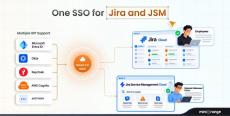
Jira is rarely used by just one type of user. Primarily, teams use Jira Cloud for project management. At the same time, support teams work inside Jira Service Management (JSM), while internal employees and external users such as customers, vendors, and partners may access the JSM portal. They are all accessing the same Atlassian ecosystem, but they do not necessarily log in the same way. This is where organizations can run into a problem.

|
By miniOrange
Watch this session from BSides Ahmedabad 2026 to learn about the core values driving miniOrange in the cybersecurity industry. In this session, Our Founder & CEO Mr. Anirban Mukherji reflected on the journey of miniOrange, focusing on the company's growth, achievements, and contributions to the security landscape. He outlined the fundamental principles that defines culture, specifically highlighting commitment to hard work, discipline, initiative, ownership, and meritocracy.

|
By miniOrange
Welcome to the recording of our recent webinar “One Breach Away: Why Managed Devices Are the New Perimeter for AI, Finance and Healthcare Data.” In this session, our experts discuss how organizations can secure access to business applications, sensitive data, and AI tools by making device security a core part of their identity and access strategy. As employees connect from personal devices, remote environments, and multiple endpoints, ensuring device compliance and security posture has become critical for protecting enterprise data.

|
By miniOrange
In this session, our founder and CEO Anirban Mukherji explained how to master metabolic fasting to optimize your health. Learn the practical steps to reset your body and improve daily energy levels. It breaks down the core science behind how your body processes fuel. He examined the hunger code to help you understand why you feel hungry at specific times and how to regain control over your eating patterns. By implementing these strategies, you can begin managing cravings effectively without feeling deprived or overwhelmed.

|
By miniOrange
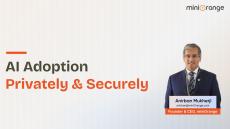
In this Session at GISEC Global 2026, Dubai Exhibition Centre (DEC), Expo City, our Founder & CEO, Mr. Anirban Mukherji, discussed the importance of balancing AI innovation, data sovereignty, privacy, and national security in the era of frontier Large Language Models.


|
By miniOrange
In this session at CyBe AI Summit 2026, NIMHANS Convention Centre in Bengaluru, our Founder & CEO Mr. Anirban Mukherji discussed current AI trends, geopolitical and sovereignty risks tied to frontier LLMs, and practical implementations for India. He addressed how AI-driven automation like delivery robots and drones can disrupt jobs, why governments and defense agencies require air-gapped or on-prem solutions, and how cost and restricted access to frontier models create inequity in AI adoption.


Shopify Customer Accounts Migration: Maintain Custom Login, Sign-up & Onboarding Workflows | Webinar
|
By miniOrange
With Shopify’s Legacy Customer Accounts being deprecated and merchants moving to Customer Accounts, maintaining the customer experience they have built around login, sign-up, and onboarding can become challenging. In this webinar, we look at the challenges merchants may encounter after migration and demonstrate practical methods to create login and onboarding experiences that are better aligned with their store requirements.
|
By miniOrange
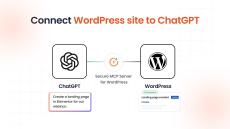
The Secure MCP Server turns your WordPress website into an MCP (Model Context Protocol) server, allowing ChatGPT and other compatible AI clients to securely interact with WordPress. ���� �������� ����������, ������'���� ����������: • How to install the Secure MCP Server plugin on WordPress• How to configure the MCP Server• How to connect your WordPress website to ChatGPT• How to authorize ChatGPT to access WordPress• How to test the MCP connection• How ChatGPT can interact with your WordPress website through MCP• How to view and monitor audit logs of MCP activity.
|
By miniOrange
Our Founder & CEO Mr. Anirban Mukherji delivered an insightful session at Uttoron 2026, the Annual Business Conclave, sharing his personal and professional journey from a small team to leading a homegrown technology firm focused on identity security, privacy, and AI solutions tailored for India.
- October 2026 (17)
- September 2026 (37)
- August 2026 (28)
- July 2026 (34)
- June 2026 (33)
- May 2026 (32)
- April 2026 (24)
- March 2026 (32)
- February 2026 (23)
- January 2026 (19)
- December 2025 (27)
- November 2025 (19)
- October 2025 (24)
- September 2025 (24)
- August 2025 (16)
- July 2025 (18)
- June 2025 (18)
- May 2025 (18)
- April 2025 (15)
- March 2025 (16)
- February 2025 (19)
- January 2025 (18)
- December 2024 (8)
- November 2024 (8)
- October 2024 (13)
- September 2024 (20)
- August 2024 (5)
- May 2024 (1)
Get industry-leading security solutions for your employees, customer, and partner to enhance productivity, frictionless user experience, and increased customer sign-ups.
miniOrange is a world-class cybersecurity organization that has been delivering innovative products in the cybersecurity space for over a decade. With a focus on Identity and Access Management (IAM) and Customer Identity and Access Management (CIAM), we offer cutting-edge solutions to secure your workforce, customers, and partners.
Secure Digital Experience for your Workforce:
- Frictionless Secure Login: Avoid the burden of signing in and out many times for app access of users abd business partners and improve your Workforce Productivity.
- Remote Workforce Access: Secure Identities of remote users and get secure access to tools and devices they require in a timely manner from any location – without compromising security.
- Security with ease: Use our services to manage workforce identities without a second thought. Let us worry about the Security and Privacy of your workforce identities.
- Migrate and reduce IT Friction: Reduce your costs by migrating to the cloud and enhancing your workforce or business resources.
- Improve Business Agility: Organize Identity and Access Management (IAM) solutions that can be adopted, managed easily and used by the workforce right away.
Customer Identity & Access Management (CIAM):
- Redefine Customer Experience: Enable your customers to enjoy effortless access from anywhere, anytime, on any device with seamless authentication methods like Single Sign-On (SSO), Passwordless Login, Social Login, etc. Provide customized recommendations, targeted promotions, and personalized content by leveraging comprehensive customer profiles provided by our CIAM platform and foster better customer engagement.
- Secure Your Customer Accounts & Manage Access: Prioritize the security of customer accounts by implementing robust authentication mechanisms, including MFA and Adaptive MFA. With our CIAM platform, enable 2FA with 15+ MFA methods to choose from. Streamline the onboarding process by automating the provisioning of customer accounts, granting immediate access to the necessary resources.
- Ask for Consent & Comply with Regulations: Enable customers to have full control over their personal information by providing transparency and easy-to-use privacy & consent management tools. Easily comply with requirements of data protection regulations like the General Data Protection Regulation (GDPR), California Consumer Privacy Act (CCPA), etc., and earn higher brand credibility. Know more about other compliance.