
The Top High-Quality Vocal Removers for Music, Karaoke, and Content Creation
In the dynamic world of digital content creation, the ability to cleanly separate vocals from music has become an indispensable skill. Whether you're a budding karaoke star, a music producer looking for acapellas, or a content creator on platforms like YouTube and TikTok needing background tracks, a high-quality vocal remover is your most powerful ally. Gone are the days of tinny, artifact-ridden instrumentals created by clunky, outdated software. Today, advanced Artificial Intelligence (AI) has revolutionized audio source separation, offering crystal-clear results that often preserve the integrity of the original music.
Finding the perfect tool is crucial, as the quality of the separation directly impacts your final product. This article dives into the crème de la crème of vocal removers available today, detailing their features, strengths, and weaknesses to help you select the best fit for your projects in 2025.
Most Recommended: EaseUS Online Vocal Remover
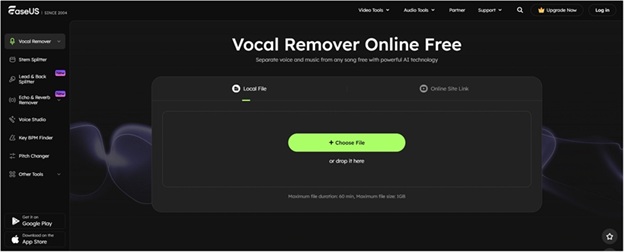
While the landscape of AI audio tools is constantly evolving, one platform stands out for its optimal blend of quality, user experience, and versatility: EaseUS Online Vocal Remover. This web-based solution has rapidly become a favorite for its near-instantaneous processing and the high fidelity of its output. It's the suggested all-in-one tool for both casual users and professionals.
The core strength of EaseUS is its proprietary AI algorithm, which is highly effective at distinguishing and isolating vocals from complex instrumental arrangements without introducing common audio artifacts. This makes it ideal for producing clean instrumental tracks for karaoke or video soundtracks. For users who prefer a dedicated desktop environment, EaseUS also offers the separation technology within its comprehensive media toolkit, EaseUS VideoKit, providing offline functionality and additional editing capabilities.
Best High-Quality Vocal Removers Detailed
The modern vocal remover market is dominated by powerful, AI-driven solutions. Here is a detailed look at the top contenders, rated and reviewed for their features and performance:
1. EaseUS Online Vocal Remover (Desktop version is EaseUS VideoKit)
- Rating: ⭐⭐⭐⭐⭐
- Main Features: High-fidelity AI-powered vocal and instrumental separation; supports a wide array of audio and video formats (MP3, WAV, FLAC, MP4, MOV, etc.); allows input via file upload or directly from a YouTube/SoundCloud URL; offers additional tools like key and BPM finder.
- Pros: Exceptional audio quality with minimal artifacts; extremely fast processing; supports extracting from video files; simple, intuitive web interface great for beginners; cloud-based, requiring no download. AI stem splitter.
- Cons: Free tier may have limitations on file size or usage; some advanced features (like batch processing or lossless download) may require a paid subscription.
2. Tunebat (Cloud-based, AI-driven)
- Rating: ⭐⭐⭐⭐
- Main Features: Primarily known for its BPM and Key Finder, Tunebat also offers a solid AI-driven vocal remover; separates music into Vocal and Instrumental stems; integrated with its extensive music database, which is useful for DJs and remixers.
- Pros: Strong separation quality; fast processing speed; useful integrated tools for music analysis (BPM/Key detection); user-friendly, browser-based interface.
- Cons: Free usage is often limited by file duration or size; the core feature set is more focused on music production analysis than general content creation; Pro plan is required for high-fidelity/lossless audio downloads.
3. PhonicMind (HiFi AI-powered, mobile compatible)
- Rating: ⭐⭐⭐⭐
- Main Features: Utilizes "HiFi AI" for cutting-edge source separation, aiming for studio-quality results; capable of splitting a song into four separate stems: Vocals, Drums, Bass, and Other Instruments; offers high-quality output formats including FLAC and STEM.MP4.
- Pros: Excellent sound separation quality, often lauded for its clean drum and bass isolation; great for advanced remixing and production; mobile compatible for on-the-go editing; supports a variety of file formats for upload and download.
- Cons: Free tier is very restrictive (often limited to a short preview or single song per week); subscription plans can be more expensive than competitors; some users report mixed results on highly complex mixes.
4. Notta (Browser-based)
- Rating: ⭐⭐⭐
- Main Features: While primarily known as a powerful transcription and meeting-summary tool, Notta has offered or includes vocal isolation as part of its AI audio processing suite. The main draw is its seamless, browser-based accessibility and general-purpose AI audio utility.
- Pros: Extremely easy to use with a very clean interface; fast processing speeds; works well with standard audio files; part of a larger, robust platform for audio and video transcription.
- Cons: May not offer the same advanced stem separation (e.g., separating drums and bass) as dedicated music tools; its primary focus is not vocal removal, so the feature may change or be less prioritized than its transcription services; output format options might be limited.
5. LALAL.AI Vocal Remover (Advanced stem separation)
- Rating: ⭐⭐⭐⭐⭐
- Main Features: Known for its "Phoenix" and "Orion" next-generation AI algorithms, providing one of the most precise stem separation technologies; offers 10 different stem separation types (e.g., vocals, instrumental, drums, bass, piano, electric guitar, etc.); includes 'Enhanced Processing' mode and a voice cleaner for noise reduction.
- Pros: Unmatched precision in separating multiple instruments (ideal for music professionals); supports various input/output formats, including lossless; offers noise reduction features; minutes-based packages do not expire, offering good value for intermittent users.
- Cons: Free usage is severely limited (usually 10 minutes total); minute-based credit system can be confusing; the full range of stem separation options is complex for casual users just needing a karaoke track.
Conclusion
The demand for high-quality instrumental tracks for karaoke, remixes, and video content has propelled AI vocal remover technology to incredible new heights. Today’s top tools offer results that were once only achievable with professional-grade, manual audio engineering.
For users seeking the highest level of professional-grade control and multi-stem separation, LALAL.AI is the clear winner. Its ability to isolate up to 10 stems makes it an indispensable tool for music producers and serious DJs. Meanwhile, PhonicMind provides a superb balance of quality and dedicated stem separation for those prioritizing clean drum and bass tracks.
However, for the vast majority of users—from content creators on YouTube and TikTok to casual karaoke enthusiasts—who need the best balance of speed, high-quality vocal-instrumental separation, and ease of use across various file types (including videos), the suggested all-in-one tool is the EaseUS Online Vocal Remover. Its intuitive, AI-driven platform delivers top-tier results quickly and reliably, making it the most practical and powerful choice for everyday needs.
FAQs About Top 5 High-Quality Vocal Removers
Q1: Are these vocal removers truly high-quality, or will my audio sound distorted?
A: The tools listed (EaseUS, LALAL.AI, PhonicMind, Tunebat) utilize state-of-the-art AI and machine learning algorithms trained on vast amounts of music data. This results in significantly cleaner, higher-quality separation than older methods (like phase cancellation). While no AI is perfect, especially on extremely complex or poorly mixed tracks, these tools consistently produce excellent instrumental and acapella tracks with minimal distortion or artifacts.
Q2: Which vocal remover is best for video creation (YouTube/TikTok)?
A:EaseUS Online Vocal Remover is highly recommended for content creators as it not only supports the most common video file formats (like MP4 and MOV) for direct extraction but also features a clean, fast interface, allowing you to quickly pull instrumental music for your videos.
Q3: Do I need to download any software to use these tools?
A: No, most of the top-rated options, including EaseUS Online Vocal Remover, Tunebat, PhonicMind, Notta, and LALAL.AI, are cloud-based and operate directly in your web browser. This means all the heavy-duty AI processing happens on their servers, saving your computer's resources and making them accessible on any operating system (Windows, Mac, iOS, Android). Note that EaseUS does offer a desktop version (VideoKit) for those who prefer offline processing.
Q4: Can these tools separate a song into individual instrument tracks (stems)?
A: Yes. LALAL.AI is the industry leader in this, offering separation into up to 10 distinct stems (vocals, drums, bass, piano, etc.). PhonicMind is also excellent for splitting into four core stems: Vocals, Drums, Bass, and Other. EaseUS Online Vocal Remover provides the essential separation of Vocals and Instrumental, with further separation capabilities often found in its desktop counterpart.
Q5: Is it legal to use the instrumentals created by these vocal removers?
A: Using a vocal remover is legal for personal, non-commercial use, such as practicing karaoke or personal remixes. However, using the extracted instrumental or vocal tracks for public, commercial, or monetized content (like a YouTube video or TikTok) is subject to copyright law. You must secure the appropriate licenses from the original music rightsholders (publishers and record labels) before sharing or profiting from the resulting track. Always check the specific copyright laws in your region and platform's terms of service.