
Kling Video 2.6 API: How to Build Automated Visual Simulation Workflows
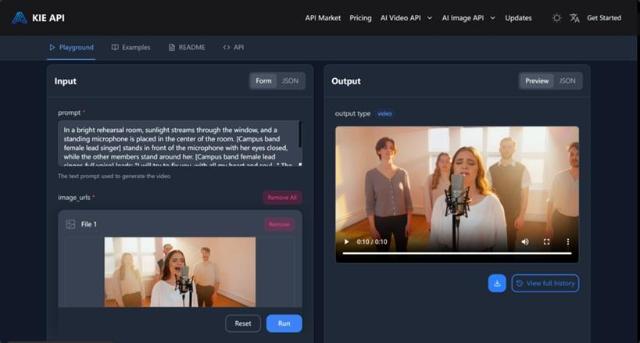
The landscape of generative media has shifted from simple prompt-based experimentation to sophisticated, integrated production pipelines. With the release of Kling 2.6, the focus has moved toward "Native Audio-Visual Generation"—a breakthrough that allows developers to synchronize high-fidelity visuals with context-aware sound in a single automated step. For platforms focusing on digital senses and technical security, the Kling Video 2.6 API offers a robust framework for building simulations that were previously too resource-intensive to automate.
Implementing the Kling Video 2.6 API for High-Fidelity Simulations
Modern simulation workflows require more than just moving pixels; they require environmental coherence. The 2.6 iteration of the Kling engine addresses this by interpreting complex storyboards through advanced semantic understanding.
Leveraging Native Audio-Visual Synchronization
Unlike earlier models that required separate post-processing for audio, the Kling Video 2.6 API generates synchronized speech and sound effects simultaneously. This "one-step" generation ensures that vocal lip-syncing and environmental ambient noise are perfectly aligned with the visual action. In a technical or security simulation context, this means that auditory cues—such as a specific verbal warning or the sound of a mechanical failure—are rendered with high temporal accuracy.
Precision Control and Semantic Intelligence
The API provides granular control over the acoustic layer. Users can define not only the spoken content but also the emotional tone and rhythm of the voice. This level of detail is supported by a deepened semantic understanding, allowing the API to interpret nuanced text descriptions and translate them into logical visual sequences that respect the laws of physics and lighting.
Navigating the Kling 2.6 API Documentation for Seamless Integration
Integrating a high-performance model into an existing tech stack requires a clear understanding of the architectural requirements. The Kling 2.6 API documentation outlines a RESTful approach that prioritizes scalability and system stability.
Architecting the Generation Pipeline
The integration process begins with the establishment of a secure connection using Bearer Token authorization. Whether the workflow triggers a Text-to-Video or a Kling Image to Video API task, the system utilizes a unified job creation endpoint. By passing structured JSON payloads—including parameters for duration (5s or 10s) and a boolean for sound activation—developers can initiate complex rendering tasks without maintaining local GPU clusters.
Efficient Task Management via Callbacks
For professional-grade applications, the documentation recommends an asynchronous communication model. Instead of continuous polling for task status, the use of a callBackUrl allows the system to push notifications automatically once the generation is complete. This architectural choice is critical for managing high-volume simulation queues, ensuring that system resources are used efficiently while maintaining a low-latency feedback loop for the end-user.
Maximizing Efficiency with Kling 2.6 API Price and Performance Scaling
When moving from a prototype to a production-ready simulation tool, cost-efficiency becomes as vital as technical performance. The pricing structure for the Kling 2.6 API on Kie.ai is designed to accommodate various scales of operation, from individual research to enterprise-level deployment.
Cost-Benefit Analysis of Tiered Pricing
The API follows a clear pricing logic based on duration and the inclusion of audio. For instance, a 5-second silent simulation is positioned at $0.28, while the full audio-visual experience for a 10-second clip is scaled to $1.10. This transparent Kling 2.6 API price model allows project managers to forecast expenses accurately when building large-scale automated datasets or interactive simulation environments.
System Reliability and Error Handling
Integrating the Kling AI 2.6 API also involves managing operational limits. The API returns standardized response codes to handle scenarios such as rate-limiting or insufficient credits. By monitoring these signals through a centralized dashboard, organizations can ensure that their automated workflows remain uninterrupted even under heavy load.
Advanced Techniques in Kling Image to Video API Integration
The Kling Image to Video API serves as a bridge between static data and dynamic motion. In security and sensory research, this is particularly useful for animating static floor plans, surveillance snapshots, or architectural blueprints into "what-if" scenarios.
By utilizing the 1000-character prompt limit, developers can inject specific environmental variables—such as lighting directions or camera movements—into the generation process. This ensures that the output is not just a random animation, but a controlled simulation that adheres to the specific requirements of the technical project.
Conclusion
The integration of the Kling 2.6 API into automated workflows represents a significant step toward the industrialization of synthetic media. By combining sophisticated semantic interpretation with a streamlined API architecture, the platform enables the creation of complex, audio-visual simulations at scale. As the technology continues to evolve, the ability to generate high-fidelity, synchronized content will likely become a foundational requirement for any system focused on the intersection of digital vision and sensory technology.