
How to Rent a Server in the USA While Living in Ukraine: My Experience, Challenges, and Tips
When I first thought about renting a server in the USA while living in Ukraine, I believed it would be pretty simple: choose a hosting provider, pay, and start using it. But in reality, it turned out to be quite an adventure — full of losses, misunderstandings, and surprises related to exchange rates and support delays. Today, I want to share my personal experience so that maybe some of you can avoid the same mistakes.
Why I Needed a Server in the USA in the First Place
Let’s start with the reasons. I work with international clients — mostly from California and New York. Website loading speed, stable connections, and compliance with local regulations are crucial. One of my clients even told me, “If the hosting isn’t in the US, I won’t even consider it.” So, I had no choice — I needed a US-based server. At first, I tried using CDNs, proxies, and even VPS servers in Europe. But latency, slow image loading, and unreliable connections still caused issues. The solution was clear: rent a server directly in the USA.
Choosing a Provider: How Not to Get Lost in the Crowd
When I started searching, I was overwhelmed. Dozens of companies, hundreds of plans — all claiming to be “the best on the market.” I ended up choosing a fairly well-known American provider, and honestly, that was my first big failure.
Here’s why:
-
Support only worked on weekdays, during US business hours.
-
Their verification process required tons of documents — including a selfie with my passport next to my monitor.
-
After paying with my card, they froze my account until a manual review was completed, which took more than a week.
In the end, I lost time, nerves, and about $30 they “withheld” for server setup — even though I never really got to use the server.
How I Solved the Problem: Choosing a Ukrainian-Based Provider
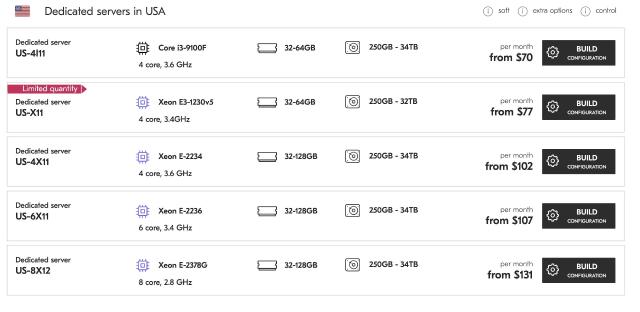
After that failed attempt, I started looking for alternatives — companies that work with US data centers but have offices in Ukraine or at least Ukrainian-language support. That’s how I discovered DeltaHost — a Ukrainian provider that offers servers in the USA while handling all customer service locally, with no language barrier and no time zone issues.
What I liked:
-
Payment in UAH or at a fair USD exchange rate.
-
Fast support in Ukrainian and Russian.
-
Minimal document requirements — no intrusive verification.
Here’s a link to their US servers: https://deltahost.ua/dedicated.html
Problems and Losses: What You Should Know in Advance
To be honest, even with a solid provider, not everything went smoothly.
1. Currency Losses
I got unlucky with timing — the exchange rate jumped unexpectedly. Instead of the expected $85/month, I ended up paying closer to $100 in local currency. If you're paying from Ukraine, always check the current rate and consider paying several months in advance.
2. Connectivity Issues
Once, I needed an urgent system reinstall on my server. It was Sunday evening. I missed a project deadline because the server took nearly 4 hours to reconfigure. Compare that to a typical European server where such tasks are done in 10–20 minutes.
3. Data Loss During Migration
One of the most painful issues. I migrated my websites from a server in Frankfurt to the US. Everything seemed fine — until some of my sites “broke” due to different NGINX configs and PHP versions. Fixing it took nearly two full days.
My advice: Always back up your data and double-check server settings before migration.
Real-Life Situations
I remember a friend of mine from Ukraine who rented a server directly from a Texas-based provider. One day, they shut down his server for 48 hours due to “suspicious activity” — just because he installed a custom monitoring script. No warning, no explanation. His online store was offline the whole time. When he reached out, support just replied: “Sorry, policy.”
Since then, I realized having support in your own time zone isn’t a luxury — it’s a necessity.
So, How Do You Properly Rent a Server in the USA From Ukraine?
1. Choose a reliable provider
This is the most critical step. You have two main options:
-
Directly renting from a US provider.
These include large companies like OVH (with US data centers), Hetzner’s US resellers, or DigitalOcean. While these are powerful and often offer competitive pricing, dealing with them directly means:-
All communication is in English.
-
You’ll need to provide ID or billing verification.
-
Support may not be available when you’re awake — imagine needing urgent help at 3 PM Kyiv time, but they’re asleep in California.
-
-
Working with a Ukrainian provider offering US-based servers.
This is what I eventually chose. For example, DeltaHost offers physical servers located in the USA, but communication, billing, and tech support are handled locally. You get:-
Transparent pricing in UAH or USD.
-
Localized support in Ukrainian or Russian.
-
Easier payment options via local banks or cards.
-
My tip: Start by reaching out to both types of providers. Ask about their provisioning time and how fast support responds. You’ll feel the difference immediately.
2. Understand the payment terms
This might sound boring, but it can save you money — and a lot of frustration.
- Currency: Are you billed in USD or UAH? If in USD, what is their exchange rate?
- Conversion Fees: If your bank or card doesn’t support USD properly, you could lose up to 5–10% on the transaction.
- Hidden Fees: Some providers charge extra for setup, OS installation, reboots, or support tickets. Ask for a full breakdown of what's included.
- Example: I once paid $85 for a server, but my bank charged an additional $7 as a “foreign transaction fee.” Multiply that by 12 months — and you’ve overpaid for an extra month without realizing it.
3. Check the support hours
This is where most people suffer after renting the server.
-
Are they available 24/7? Emergencies don’t follow a schedule. If your server crashes on a Saturday night, you don’t want to wait until Monday.
-
What language do they support? Some US companies provide only English support. That might be fine for basic issues, but when it gets technical — describing a problem becomes harder.
-
What time zone are they in? A provider with support during your working hours is much easier to deal with.
Pro tip: Send a support request before renting and see how fast and how well they respond.
4. Ask for a trial period
This is often overlooked, but it’s the best way to test everything before committing.
Even a 24-hour trial will show you:
- How fast the server is.
- How responsive support is.
- If your apps and systems work properly on their setup.
Example: One provider offered me a server that looked good on paper, but during the trial, I found that my application couldn’t run properly due to strict firewall rules. I saved myself from a full month of headaches just by testing it for a day.
5. Always back up your data
This seems obvious, but many people skip it — until it's too late.
Before migrating to a new server, create a full backup of all files and databases.
Use automated tools or cloud storage (like Backblaze or Dropbox) to keep daily snapshots.
Ask your provider if they offer remote backup options — some do, even for free.
Real case: I once assumed that because the provider had RAID protection, I didn’t need backups. Then a configuration error during migration wiped half of my project files. It took two days to recover everything.
6. Know your server’s location
Not all servers in the USA are equal in terms of speed and routing.
East Coast (Virginia, New York, Chicago):
Shorter routing paths to Europe, better latency for Ukrainian and EU visitors. Ideal if your users are split between US and Europe.
West Coast (California, Oregon):
Great if you’re targeting users in the western US or Pacific region, but worse ping to Ukraine and Europe.
Central USA (Texas, Missouri):
A middle ground — decent latency to both coasts and abroad.
Example: I hosted one of my sites in Los Angeles, and the ping from Kyiv was around 200ms. After moving it to Virginia — it dropped to 90ms. That difference matters when loading large media or e-commerce pages.
Final Thoughts on This Section
Each of these steps sounds simple — but when combined, they create a reliable, long-term solution that works from Ukraine without stress. Skipping any one of them can lead to:
-
Overpaying.
-
Delayed projects.
-
Losing clients due to downtime.
So take your time, test, compare, and make sure you have someone on your side who speaks your language — both literally and technically.
Or worse — total data loss.
Conclusion: Is It Worth It?
Yes — renting a server in the USA while living in Ukraine is absolutely doable. But you need to watch out for the small things that can turn into big problems: currency fluctuations, timezone mismatches, communication gaps.
If you're working with American clients, launching a product for the US market, or need low latency for SaaS platforms — a US server makes perfect sense.
I recommend treating this like an investment: plan ahead, stay organized, and have some buffer time and budget.
And please — don’t skimp on support or backups. Learn from someone who had to rebuild everything piece by piece.
If you’d rather not go through all of this alone, start with a provider who’s already walked that path. For example, check out DeltaHost’s US-based servers and ask them your questions directly. It’ll save you hours and a lot of stress.
Good luck — and may your server choice be the right one!