
How to Compress Video Online Without Losing Quality? [Free Methods]
![How to Compress Video Online Without Losing Quality? [Free Methods]](/sites/default/files/images/how-to-compress-video-online-without-losing-quality.jpeg "How to Compress Video Online Without Losing Quality? [Free Methods]")
In today’s digital world, video content has become one of the most popular sources of entertainment. Thanks to high-speed internet and powerful devices, it has now become very easy and quick to download and save these video files. But downloading high-resolution videos often comes with a challenge: large file size. Oversized video content can cause problems when uploading it to YouTube, sharing it on WhatsApp, or storing it anywhere, including your Google Drive.
But don’t worry – we have an amazing solution for you! If you have large video files and want to upload or save them, compressing is the way to go. There are several methods available that you can try to compress your video files without losing quality. In this guide, we’ll walk you through how to compress video online without losing quality.
Say goodbye to storage issues and slow uploads—let’s get started!
Why Should You Compress Video Files?
Before exploring different video compressor methods to compress video online, let’s understand why compression matters:
Increase Uploads/Downloads Speeds
On various platforms, such as YouTube, WhatsApp, or Google Drive, large video files take longer to download or upload. Compressing them can make uploads and downloads faster – even with an unstable internet connection. This efficiency becomes incredibly evident when capturing raw source footage through an HDMI to USB video converter, which frequently outputs dense data streams that demand heavy processing power. Pre-compressing these intensive, uncompressed hardware feeds before initiating web transfers drastically reduces system strain and avoids frustrating platform upload timeouts
Save Valuable Storage Space
High-resolution video files (such as 4K or 1080p) can quickly take up storage space on your device or in the cloud. Compressing videos helps free up storage space by reducing file content or slightly affecting quality.
Enhance Streaming Experience
Compressing videos can make streaming more efficient and quicker, as it helps in reducing lag or buffering during playback.
Save Bandwidth Usage
Compressed videos take less internet bandwidth while uploading, downloading, or streaming. This not only saves your data overages but also speeds up your online activities.
How Do I Compress Online Without Losing Quality?
Now that you understand that compressing videos is a smart move, as it saves time, space, and hassle. Let’s move to different video compressor methods to compress your video files online:
Method 01: Adjust the Bitrate of Your Video
Bitrate refers to the data that a video processes per second (usually in kbps or Mbps), and thus it directly impacts both quality and the file size of your video file. Lowering the bitrate can reduce the amount of processed data and result in file shrinkage. There are many video compressors, such as Clideo, Veed.io, and Kapwing, available online that allow you to manually set or choose a preset bitrate.
Pros:
- Allows fine-tuning to balance video quality and file size precisely.
- Best for compressing videos that have minimal movement or static backgrounds.
Cons:
- Too low bitrate can result in visible pixelation and distortion.
- Adjusting the bitrate won’t work for videos with rapid movement or action scenes.
Method 02: Use Efficient Codecs
Codecs help in compressing and decompressing video data. You can change your video codec to modern codecs like H.265 (HEVC) for better compression and file size reduction. There are several online tools which can convert your video codec to save space without compromising quality.
Pros:
- Best approach to reduce video file size.
- Delivers excellent visual quality.
- Compatible with advanced formats like 4K and HDR
Cons:
- Incompatible with older devices or outdated software.
- Compression process can take more time compared to older codecs.
Method 03: Compress Video Using Free Online Video Compressor Tool
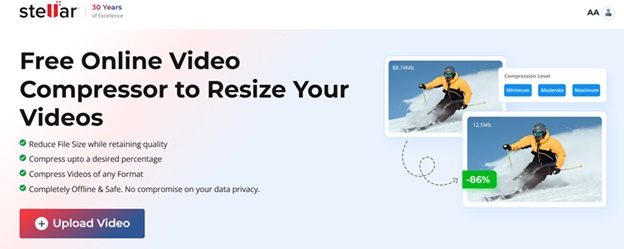
If you are looking for a simple and direct approach to compress your video files online without losing quality, then an online video compressor tool will be the best option. One of the most reliable and user-friendly tools for this purpose is Stellar Online Video Compressor. It is a web-based tool designed to compress videos in a few simple steps. Unlike traditional tools, this online video compressor doesn’t need any installation and works directly from a web browser.
Key Features of Stellar Online Video Compressor:
- The software uses an advanced compression algorithm to reduce your video file size without affecting its sound quality, clarity, and video resolution.
- It is compatible with all video file formats, so no need to worry about file compatibility.
- This tool offers a simple drag-and-drop interface, which you can easily use to compress a video file in just a few simple clicks.
- The platform is 100% safe and secure. It keeps your video private and safe during the whole compression process.
Here’s how to compress video online without losing quality using the Stellar Online Video Compressor:
Step 1: Open a web browser and visit the Stellar Online Video Compressor official website.
Step 2: Click the Upload Video button to add the video file that you need to compress.
Step 3: From the next screen, choose the percentage of compression you need to perform and click Compress to initiate the process.
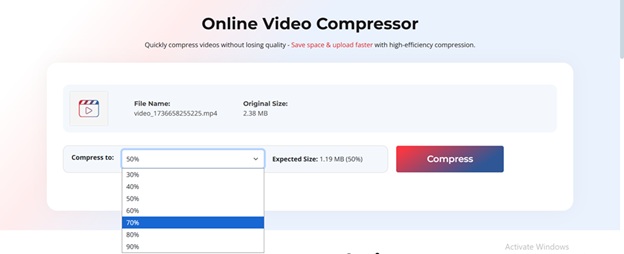
Tip: A higher compression percentage will result in a smaller file size.
Step 4: Allow the tool to analyse and compress your video. Once the process is complete, the compressed video will be displayed. Simply download it to your device.
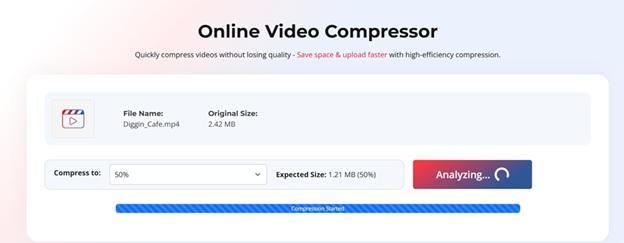
That’s it! Your video is now compressed.
FAQs: How to Compress Video Online Without Losing Quality
Is it possible to compress video online without losing quality?
Yes, you can alter your video bit rate or use modern codecs like H.265 to significantly reduce its size while maintaining quality.
Can I compress video for free?
Yes, there are several online tools like Stellar Online Video Compressor, which can help you to compress videos for free without losing their quality.
Is it safe to upload personal videos to online compressors?
Some reputable tools like Stellar Online Video Compressor are 100% safe and secure, and they ensure data privacy. If you are planning to use any other tool, always check its platform’s policy.
Wrapping Up
Managing video files in today’s digital-first world is just as crucial as creating them. However, large video sizes often cause trouble, particularly during uploads or sharing. Whether you’re a student, professional, or content creator, video compression is very important and helps in saving storage space and reducing upload times. Online tools such as Stellar Online Video Compressor make this process effortless, enabling you to reduce file sizes without compromising quality. With just a few simple steps, you can shrink even large video files while retaining their original sharpness.