
Frozen Trust Assets Lose Reach Without Image to video

Image Source: depositphotos.com
Professional feeds reward motion now, even when the topic is serious. Security and trust teams still publish badges, dashboard screenshots, and leadership photos that legal already cleared. Those stills are solid proof. They also look frozen next to moving cards. That is why more brand marketers are testing an Image to video path on photos they already own.
The real problem is not a lack of ideas. Growth wants a short clip. Legal does not want a random edit. Design is booked. The post slips a week, then another week.
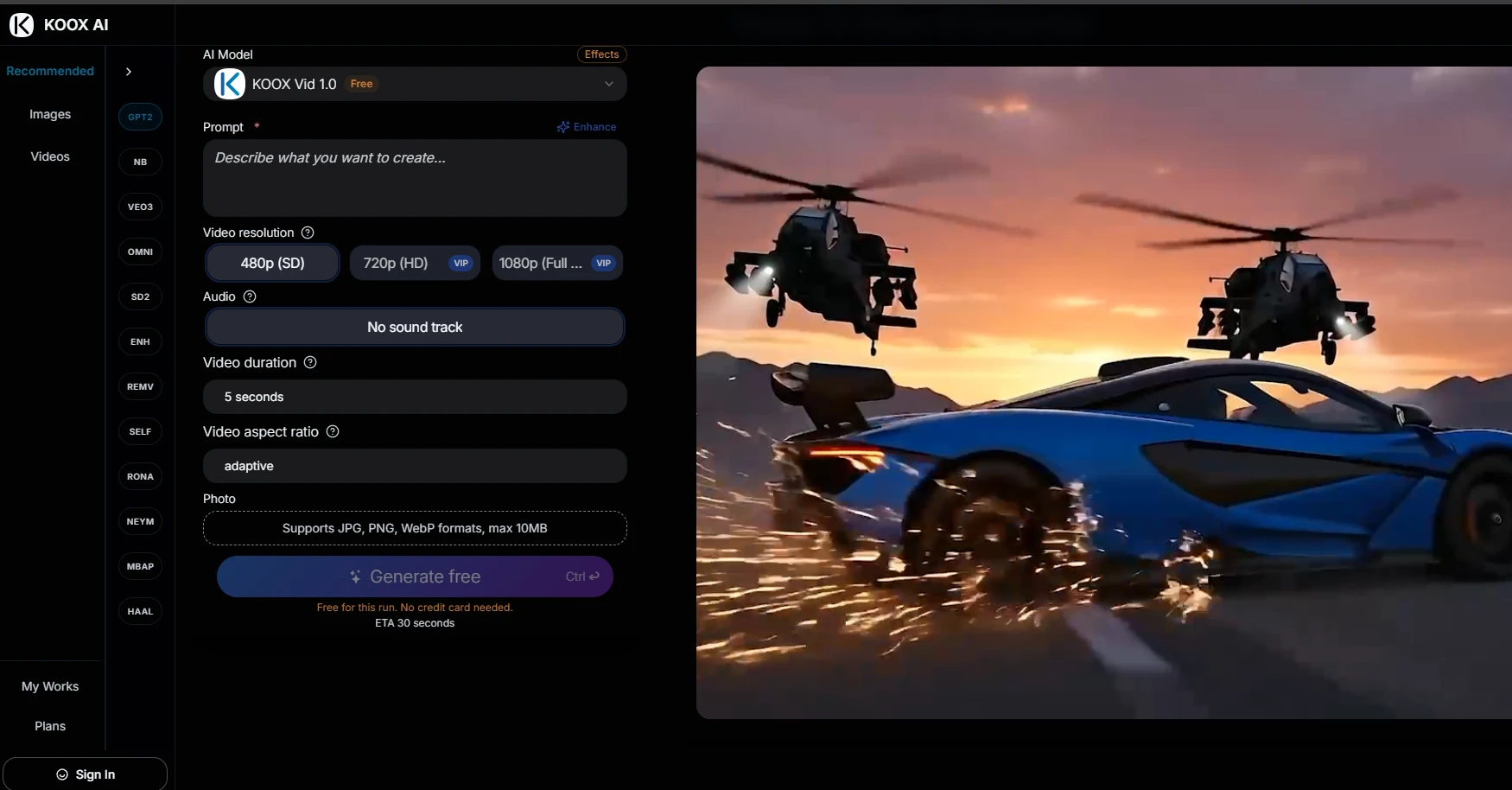
KOOX AI sits in that gap as a browser loop: upload a cleared still, describe a small move, generate a short clip, then keep only the take that still looks like your brand. The claim worth checking is practical. Can a 5-second clip keep badge edges and faces readable after motion?
Why Cleared Proof Assets Stop Getting Attention
A clean badge used to earn a pause. Buyers would read the claim and move on. Now the same badge can feel unfinished next to motion-heavy cards, even when your proof is stronger than theirs.
You see it in dull ways. Hero modules get skipped. Social-proof blocks get fewer clicks. Someone asks for video again, and nobody wants to reopen legal review for a two-second loop.
Serious Topics Still Sit On Motion Heavy Feeds
Security content is serious. The platforms are not. Buyers still skim. If your proof asset never moves, it gets less time on screen. That is not a taste debate. It is how feeds behave.
Good Photo Archives Turn Into Unused Inventory
The better your cleared archive is, the more annoying this gets. You already paid for the shoot. You already locked the crop. Then the asset sits in a folder because nobody has a clean way to turn it into a short clip without starting permission theater again.
Old Fixes Cost More Than They Look
Option one: book another shoot or a motion designer. Safe, slow, and often late for weekly posts.
Option two: drop stock motion under the still. Faster, but it usually looks glued on. Careful buyers can tell.
Option three: rebuild a dashboard scene in After Effects. Fine for one hero piece. Painful if you need a steady stream of trust posts.
|
Old fix |
What you gain |
What you pay |
|
Reshoot |
Fresh control |
Time plus reapproval |
|
Stock motion |
Speed |
Fake feel on trust pages |
|
Heavy edit |
One polished hero |
Too slow for weekly posts |
|
Short still motion |
Uses cleared assets |
Needs strict QC on edges |
Read the table as a cost map, not a feature list. If your pain is weekly feed motion from assets you already trust, the last row is the one worth testing first.
Reshoots Make You Reapprove Work You Cleared
Every reshoot brings back questions you already answered: logo use, claim wording, framing, faces. You pay again for permission you already have.
Generic Motion Can Make A Trust Page Look Fake
If the motion has nothing to do with the product, the page feels stylish and empty at the same time. For trust content, that is a real problem.
A Smaller Workflow Using Photos You Already Trust
The better path is narrower. Take an approved still. Ask for one small move. Keep the clip only if identity holds. On the live generator, KOOX AI keeps this short: drop image, type motion, generate, download.
What the page actually shows: JPG, PNG, or WebP up to 10 MB. A 5-second clip length. 480p available. 720p and 1080p marked VIP. Prompt Enhance is there. Audio can be set to no sound track. Output and timing can change with image, model, settings, and queue conditions.
That is enough for a weekly trust post. You are not making a film. You are making a cleared still usable again. While checking those controls, the second link for image to video ai belongs here, because this is where the tool and the settings live on the same page.
Write Prompts That Protect Badges And Faces
If the badge must stay sharp, do not ask for a dramatic spin. Ask for a slow push-in or a light shift. Big prompts look exciting in theory and break edges in practice.
In my testing, thick badge shapes held up better than thin line logos. A single leadership portrait held up better than a six-person group shot. Sort your archive before you spend credits.
Write the brief in plain words. Example: slow push toward the badge, no spin, no extra glow, no invented props. Soft mood language gets soft results. Clear camera notes get usable clips.
Decide Sound Before Legal Sees The File
Most trust posts look cleaner silent. Use no sound track, then add an approved track later if the channel needs audio. Do not let a random generated sound become the reason legal opens the file again.
Keep A Small Reject Folder While You Work
The bad takes show the same failures again and again: hard spins on logos, big head turns on portraits, busy screenshots asked to do too much. Those rejects teach faster than another meeting.
Simple Checks Before Anyone Hits Publish
Look at the logo edges. Look at the face. Look at the UI panel lines. If any of those wobble, delete the take.
Write boring prompts on purpose. One verb. One subject. For portraits, move hair or background a little. Do not turn the head hard. For screenshots, a soft pan is safer than making the whole interface dance.
-
Does the badge still look like your badge on a phone screen?
-
Would legal recognize the same claim asset without a new ticket?
-
Is the motion one small move, or a mini movie stuffed into five seconds?
-
Did you keep a rejected take that shows what not to ask next time?
Expect to regenerate. Results change with image, model, prompt, and settings. For teams using KOOX AI, that should be normal QC, not a surprise. Build a little slack into the calendar instead of promising same-hour delivery for every batch.
One weekly rhythm works without turning this into a big project: pick three cleared stills, make two takes each, keep only the clean ones, and save the prompts that worked. Next week starts faster because you already know which still types survive.
Compared with waiting on a studio slot, you gain tempo. Compared with uncontrolled generative experiments, you keep a narrower brief tied to assets you already trust. Keep that brief visible and the workflow stays useful for brand and security marketers alike.
Where This Motion Workflow Still Falls Flat
Tiny logos, dense text, and crowded screenshots fail more often. Free credits may help a first try, but weekly volume usually needs a paid plan. Check VIP resolution before you promise HD. If a badge still shimmers after soft prompts, leave it still.
Who Should Use This And Who Should Not
Use it if you need short motion from photos legal already cleared, and you can throw away weak takes. Skip it if every frame must be pixel-perfect, or if you need a long story with dialogue.
KOOX AI fits that narrower job well: upload a cleared still, ask for a small move, keep only the clip that still looks like your brand. It will not replace a studio shoot, and it does not need to.
If the badge edges hold and the face still looks right, publish. If not, leave the still alone and try a cleaner source next time.